> ## Documentation Index
> Fetch the complete documentation index at: https://bifrost-backport-outbound-fetchers.mintlify.site/llms.txt
> Use this file to discover all available pages before exploring further.
# Webhooks
> Get a signed callback when an async inference job finishes, instead of polling for it.
## Overview
Webhooks are the push half of [Async Inference](/features/async-inference). Instead of polling `GET /v1/async/.../{job_id}` until a job reaches a terminal state, register an endpoint and name it on submit, and Bifrost delivers a signed HTTP `POST` the moment that job completes or fails.
Every delivery is signed in the [Standard Webhooks](https://www.standardwebhooks.com/) format so your receiver can verify it came from your Bifrost instance and was not altered in transit.
Webhooks fire only for async inference jobs. Like Async Inference, this is a gateway-only feature and requires a Logs Store to be configured.
**Events:**
| Event | Fires when |
| - | - |
| `async_job.completed` | An async job finishes successfully. |
| `async_job.failed` | An async job finishes with an error. |
***
## How It Works
```mermaid theme={null}
sequenceDiagram
participant Worker as Async Worker
participant Dispatcher as Webhook Dispatcher
participant Endpoint as Your Endpoint
Worker->>Dispatcher: Job reached completed / failed
Dispatcher->>Dispatcher: Render payload + sign (HMAC-SHA256)
Dispatcher->>Endpoint: POST signed delivery
alt 2xx response
Endpoint-->>Dispatcher: Delivered
else non-2xx / timeout
Endpoint-->>Dispatcher: Failed
Dispatcher->>Endpoint: Retry with exponential backoff
end
```
Delivery is **at-least-once**: a failed attempt is retried with exponential backoff, and every attempt for the same event reuses the same `webhook-id`. Your receiver must be idempotent — dedupe on `webhook-id`.
***
## Triggering a Delivery
Registering an endpoint does not, by itself, cause any deliveries. Delivery is opt-in per async job: the submit request must carry an `x-bf-async-webhook` header naming the endpoint to notify.
```bash theme={null}
curl -X POST http://localhost:8080/v1/async/chat/completions \
-H "Content-Type: application/json" \
-H "x-bf-vk: sk-bf-your-virtual-key" \
-H "x-bf-async-webhook: order-events" \
-d '{ "model": "openai/gpt-4o-mini", "messages": [...] }'
```
* The name must resolve to an existing, enabled endpoint. If it doesn't, the submit request itself fails, rather than accepting the job and silently dropping the notification.
* The endpoint must still be enabled and subscribed to the resulting event (`async_job.completed` or `async_job.failed`) when the job finishes. If it isn't, the job completes normally but no delivery is enqueued.
* Jobs submitted without the header never trigger a webhook, regardless of how many endpoints are registered.
See [Async Inference](/features/async-inference#webhook-notifications) for the full submit flow.
***
## The Delivery Payload
Each delivery is a `POST` with a JSON body and three signing headers:
| Header | Meaning |
| - | - |
| `webhook-id` | Unique id for this delivery, and the dedupe key across retries. |
| `webhook-timestamp` | Unix seconds the payload was signed at. |
| `webhook-signature` | Space-separated list of `v1,` signatures. |
The body:
```json theme={null}
{
"event": "async_job.completed",
"created_at": "2026-02-19T08:10:19.412Z",
"data": {
"job_id": "1e89b165-d4fe-49e8-beb2-3e157f2df02f",
"request_type": "chat_completion",
"status": "completed",
"status_code": 200,
"result_url": "/v1/async/chat/completions/1e89b165-d4fe-49e8-beb2-3e157f2df02f",
"result_expires_at": "2026-02-19T09:10:19.412Z"
}
}
```
| Field | Meaning |
| - | - |
| `event` | `async_job.completed` or `async_job.failed`. |
| `data.job_id` | The async job id. |
| `data.status` | `completed` or `failed`. |
| `data.result_url` | Relative path to fetch the full result. `GET` it through Bifrost with your usual auth, before `result_expires_at`. |
| `data.response` | The full job response, inlined only when the endpoint sets `include_response` and the response fits `max_response_payload_kbs`. |
| `data.response_omitted` | `true` when a response was too large to inline; fetch it via `result_url` instead. |
| `data.error` | The job's error body, inlined only when the endpoint sets `include_response` and it fits `max_response_payload_kbs`. Present only for `async_job.failed`. |
| `data.error_omitted` | `true` when an error was too large to inline; fetch it via `result_url` instead. |
| `data.result_expired` | `true` when the job's result was already gone at delivery time — the outcome is known, but there is nothing left to fetch. |
***
## Verifying Deliveries
Always verify the signature before trusting a delivery. The signature is `HMAC-SHA256` over the exact bytes `{webhook-id}.{webhook-timestamp}.{body}`, keyed with your endpoint's signing secret, encoded as `v1,`.
To verify a delivery:
1. **Recompute and compare.** Recompute the HMAC from the secret and the received `webhook-id`, `webhook-timestamp`, and raw body, then compare it (in constant time) against every candidate in the `webhook-signature` header. Accept if **any** matches — the header can carry more than one signature during secret rotation.
2. **Check the timestamp.** Reject deliveries whose `webhook-timestamp` is outside a tolerance window (5 minutes is a good default) to blunt replay attacks.
3. **Dedupe on `webhook-id`.** Retries reuse the id, so process each id at most once.
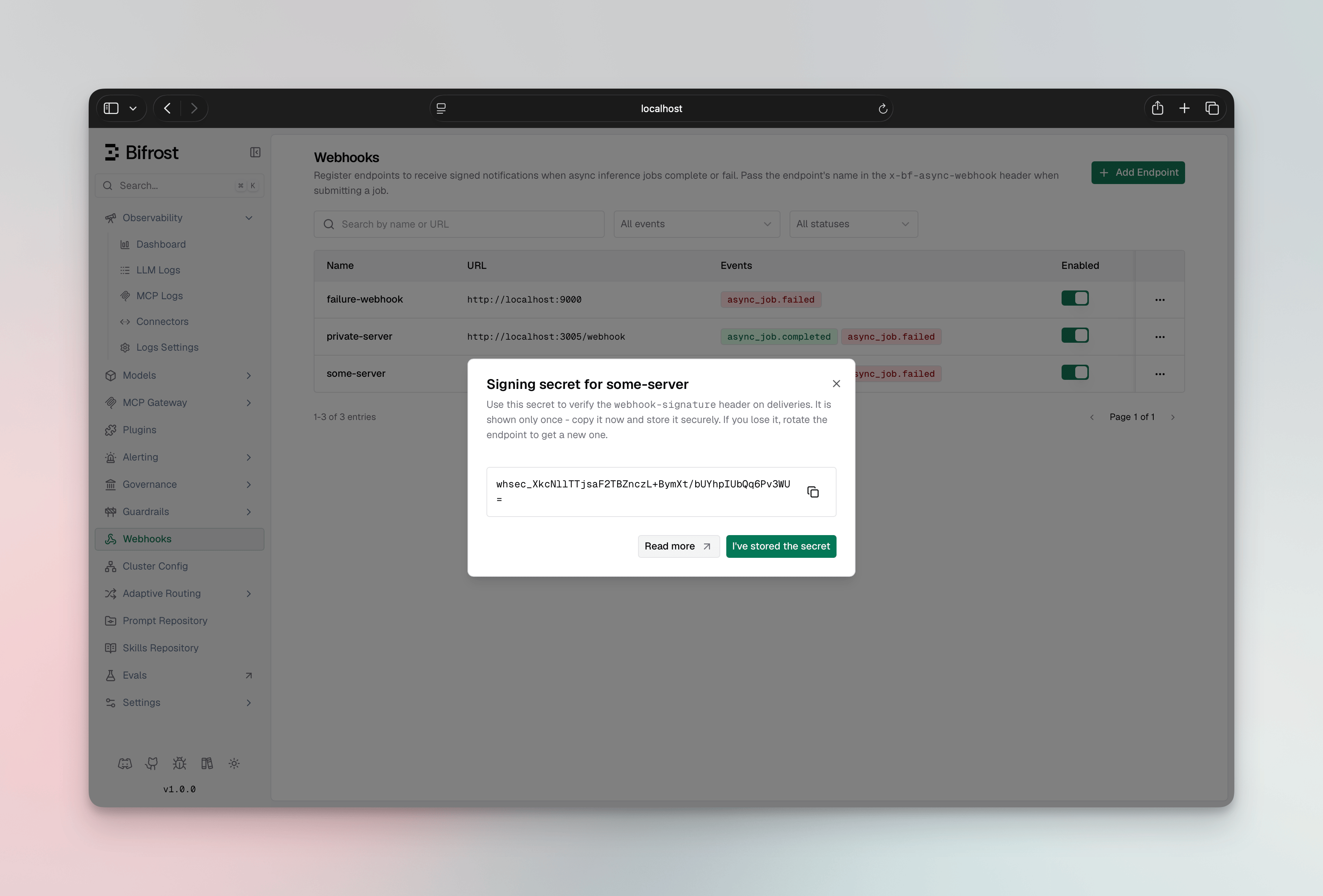
The signing secret (`whsec_...`) is shown **once** when you create the endpoint. Store it where your receiver can read it, and never hard-code it.
The [`examples/webhooks`](https://github.com/maximhq/bifrost/tree/main/examples/webhooks) receiver is a complete, dependency-free Go implementation of this verification you can copy from — its tests pin the same reference vector Bifrost signs with.
***
## Managing Endpoints
Open **Webhooks** in the sidebar to see your endpoints and their status.
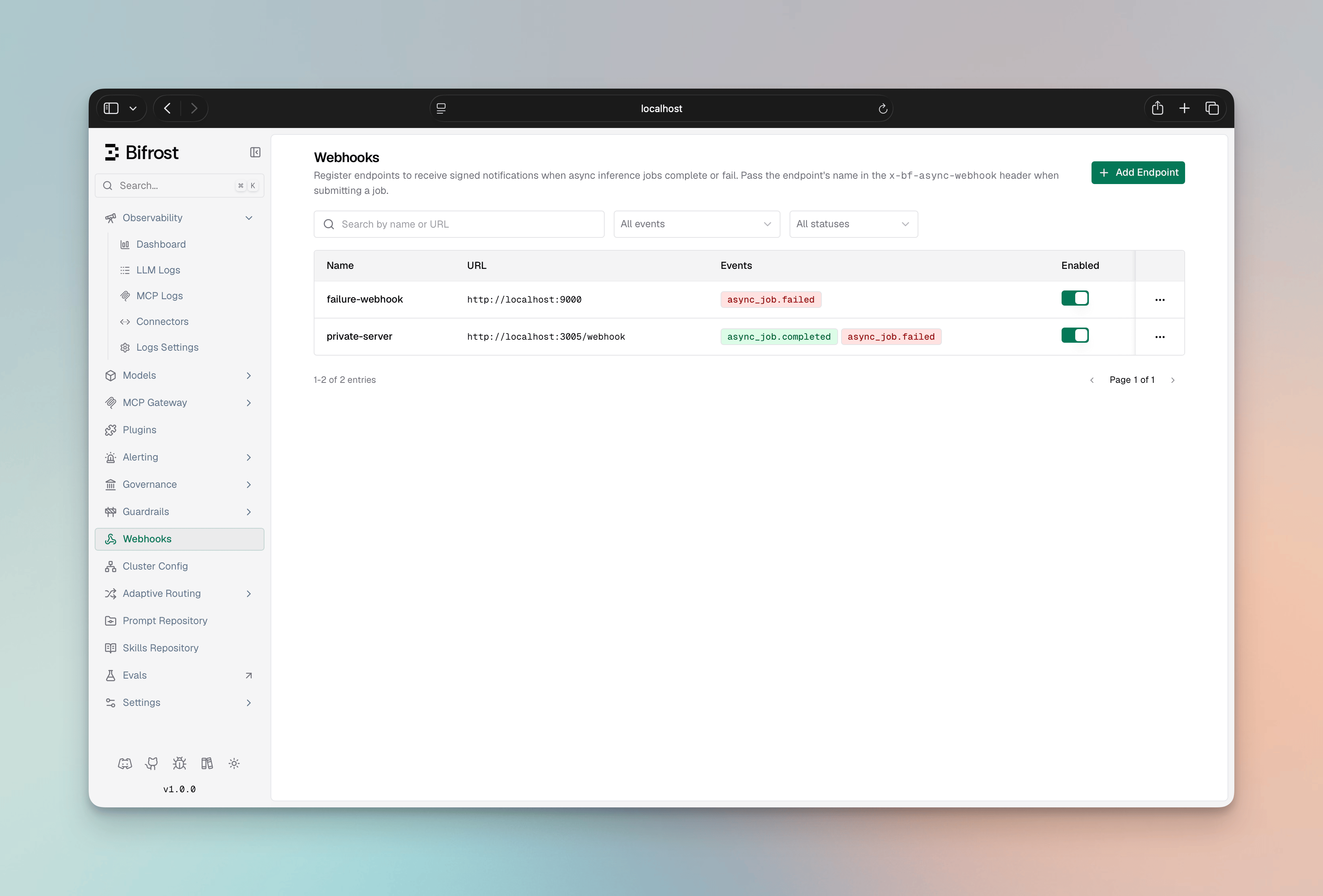 1. Select **Add Endpoint**.
2. Enter a unique **Name** and the delivery **URL** (HTTPS unless the endpoint allows private networks).
3. Choose the **events** to subscribe to (`async_job.completed`, `async_job.failed`).
4. Optionally add custom **headers** (for example an `Authorization` value your receiver requires) and toggle **Include response** to inline job responses.
1. Select **Add Endpoint**.
2. Enter a unique **Name** and the delivery **URL** (HTTPS unless the endpoint allows private networks).
3. Choose the **events** to subscribe to (`async_job.completed`, `async_job.failed`).
4. Optionally add custom **headers** (for example an `Authorization` value your receiver requires) and toggle **Include response** to inline job responses.
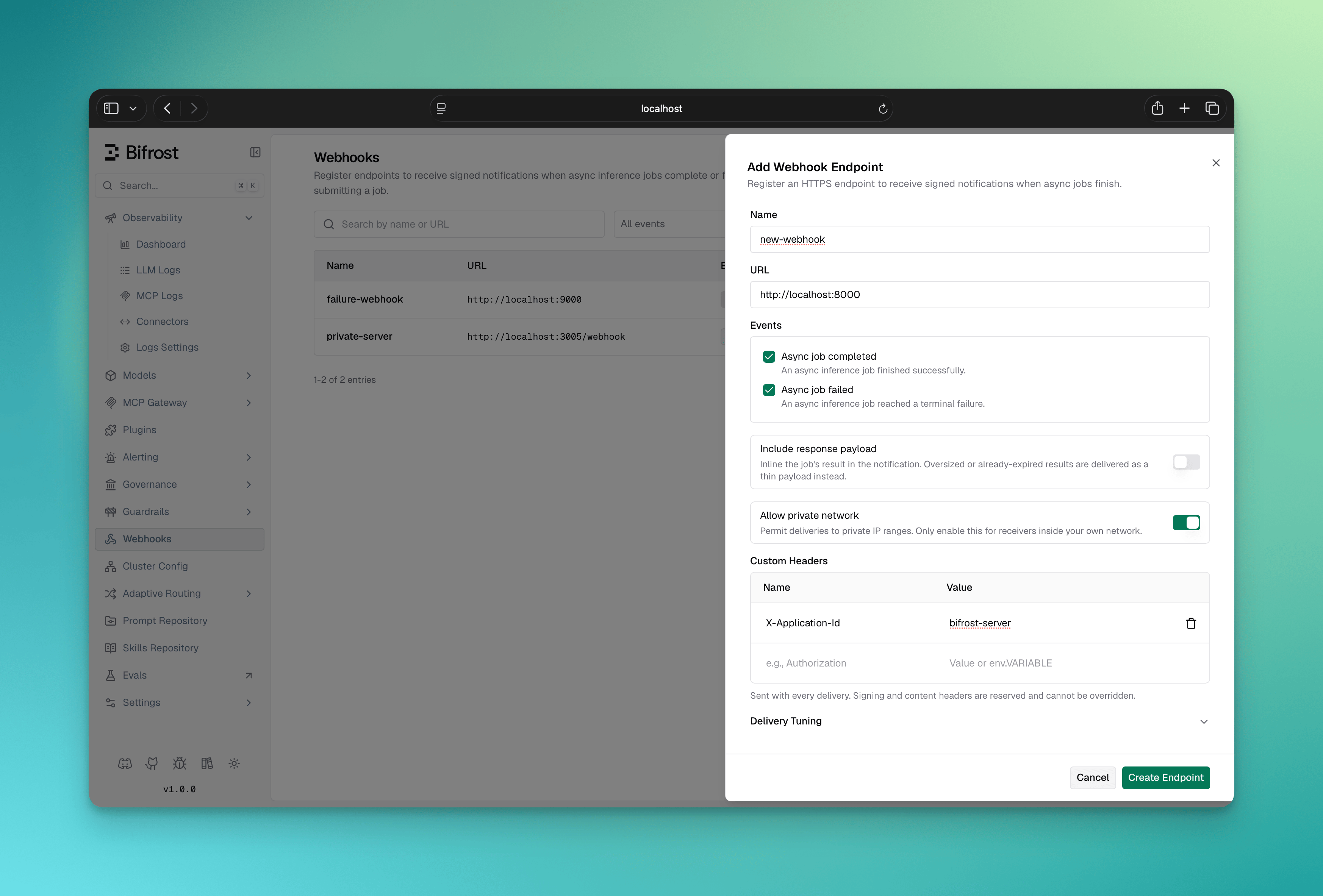 5. Save. The **signing secret is shown once** in a dialog — copy it now; you cannot retrieve it again.
 6. Open an endpoint to see its **recent deliveries**, send a **Test** delivery, or **Rotate secret** if a secret is ever exposed. Rotation takes effect immediately with no grace window, so update your receiver in the same change.
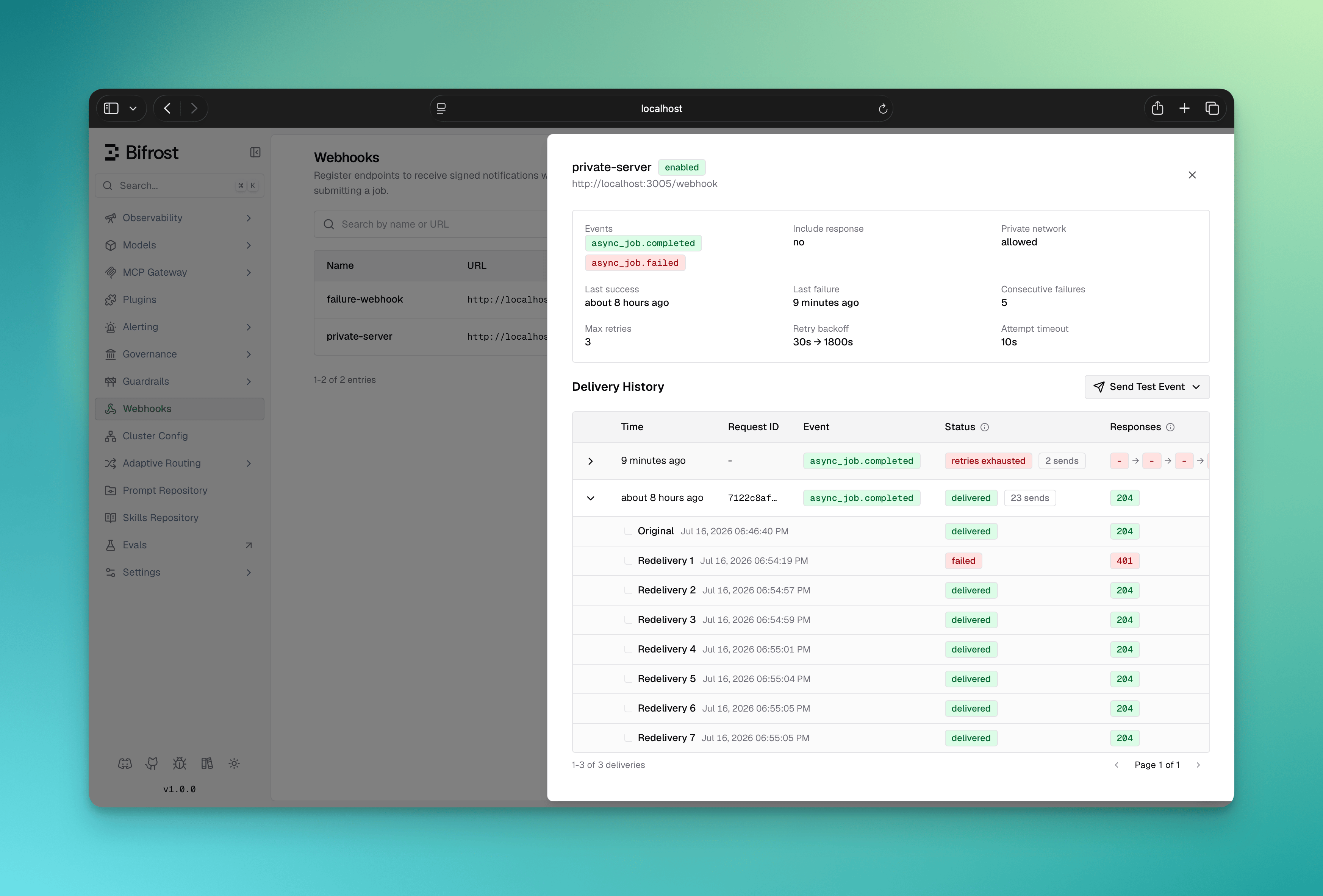 7. For anything beyond the last few deliveries, use **View delivery history** to open the dedicated deliveries page at `/workspace/webhooks/deliveries`. It lists deliveries across every endpoint and filters by outcome, event, response status class (`2xx`/`4xx`/`5xx`/no response), webhook, and time range, with lookup by request ID or delivery ID. Arriving from an endpoint pre-selects that webhook; clear the filter to see deliveries fleet-wide.
Rows are grouped by delivery, not by attempt: one row is one notification owed to the endpoint, and its `503 → 503 → 200` chips are that delivery's attempts. A delivery that was manually redelivered expands to show each send separately.
Create an endpoint. The signing secret is **server-generated** and returned once in the create response — it is never accepted as input.
```bash theme={null}
curl -X POST http://localhost:8080/api/webhooks \
-H "Content-Type: application/json" \
-d '{
"name": "order-events",
"url": "https://example.com/webhook",
"events": ["async_job.completed", "async_job.failed"],
"include_response": false
}'
```
Other operations:
| Method | Path | Purpose |
| - | - | - |
| `GET` | `/api/webhooks` | List endpoints (supports search, event, and status filters). |
| `POST` | `/api/webhooks` | Create an endpoint; returns the signing secret once. |
| `GET` | `/api/webhooks/{id}` | Get one endpoint. |
| `PUT` | `/api/webhooks/{id}` | Update an endpoint. The secret is immutable here. |
| `DELETE` | `/api/webhooks/{id}` | Delete an endpoint. |
| `POST` | `/api/webhooks/{id}/rotate-secret` | Rotate the signing secret; returns the new secret once. |
| `POST` | `/api/webhooks/{id}/test` | Send a test delivery for a chosen event. |
| `GET` | `/api/webhooks/{id}/deliveries` | List delivery history for the endpoint. |
| `GET` | `/api/webhooks/deliveries` | Search delivery history across endpoints, with filters. |
| `POST` | `/api/webhooks/deliveries/{id}/redeliver` | Re-queue a past delivery. |
The secret is never returned again after creation or rotation, and cannot be set or changed through the create/update body. Rotating is the only way to change it.
Declare endpoints under the top-level `webhooks` array. They are synced into the database at startup and reconciled by `name`.
```json theme={null}
{
"webhooks": [
{
"name": "order-events",
"url": "https://example.com/webhook",
"events": ["async_job.completed", "async_job.failed"],
"secret": "env.WEBHOOK_SIGNING_SECRET",
"include_response": false
}
]
}
```
| Field | Type | Required | Description |
| - | - | - | - |
| `name` | string | Yes | Unique endpoint name; the reconcile key. |
| `url` | string | Yes | Delivery URL. HTTPS required unless `allow_private_network` is set. |
| `events` | array | Yes | Subscribed events: `async_job.completed`, `async_job.failed`. |
| `secret` | string | No | Signing secret in `whsec_` format. Best supplied as an env reference (`env.MY_VAR`); generated when omitted. |
| `headers` | object | No | Custom headers sent with every delivery. Values support `env.VAR` syntax and are encrypted at rest when `encryption_key` is configured. Reserved delivery headers cannot be overridden. |
| `include_response` | boolean | No | Inline the job response into payloads (default `false`). |
| `allow_private_network` | boolean | No | Permit private-network receivers and plain `http` (default `false`). Test deliveries to such an endpoint require an authenticated caller: with dashboard auth unconfigured, `POST /api/webhooks/{id}/test` answers `403`. |
| `disabled` | boolean | No | Register the endpoint without delivering to it (default `false`). |
`config.json` is the only place you can supply your own signing secret, and an `env.` reference is the recommended form. Prefer creating endpoints through the UI or API so the secret is generated for you.
The global retention setting lives under `client`:
```json theme={null}
{
"client": {
"webhook_config": {
"delivery_history_retention_days": 30
}
}
}
```
***
## Tuning Deliveries
Each endpoint exposes per-endpoint controls. All are optional and fall back to the defaults below.
| Field | Default | Description |
| - | - | - |
| `max_retries` | `4` | Retries after the first failed attempt. |
| `retry_backoff_initial_seconds` | `30` | Delay before the first retry; each further retry doubles it. |
| `retry_backoff_max_seconds` | `1800` | Cap on the per-retry delay. |
| `attempt_timeout_seconds` | `10` | End-to-end bound for a single delivery attempt. |
| `max_response_payload_kbs` | `256` | Cap for inlined response/error payloads when `include_response` is set. Oversized values are omitted and flagged with `response_omitted`/`error_omitted`. |
| `max_concurrent_deliveries` | `10` | Concurrent in-flight deliveries to this endpoint, per node. |
***
## Next Steps
* **[Async Inference](/features/async-inference)** — submit jobs and poll for results; webhooks notify you when those jobs finish.
* **[Virtual Keys](/features/governance/virtual-keys)** — the `x-bf-vk` keys used to submit async jobs and fetch results.
* **[Storage: Logs Store](/deployment-guides/config-json/storage#logs_store)** — configure the Logs Store that both Async Inference and Webhooks require.
This documentation is built and hosted on [Mintlify](https://mintlify.com), a developer documentation platform.
7. For anything beyond the last few deliveries, use **View delivery history** to open the dedicated deliveries page at `/workspace/webhooks/deliveries`. It lists deliveries across every endpoint and filters by outcome, event, response status class (`2xx`/`4xx`/`5xx`/no response), webhook, and time range, with lookup by request ID or delivery ID. Arriving from an endpoint pre-selects that webhook; clear the filter to see deliveries fleet-wide.
Rows are grouped by delivery, not by attempt: one row is one notification owed to the endpoint, and its `503 → 503 → 200` chips are that delivery's attempts. A delivery that was manually redelivered expands to show each send separately.
Create an endpoint. The signing secret is **server-generated** and returned once in the create response — it is never accepted as input.
```bash theme={null}
curl -X POST http://localhost:8080/api/webhooks \
-H "Content-Type: application/json" \
-d '{
"name": "order-events",
"url": "https://example.com/webhook",
"events": ["async_job.completed", "async_job.failed"],
"include_response": false
}'
```
Other operations:
| Method | Path | Purpose |
| - | - | - |
| `GET` | `/api/webhooks` | List endpoints (supports search, event, and status filters). |
| `POST` | `/api/webhooks` | Create an endpoint; returns the signing secret once. |
| `GET` | `/api/webhooks/{id}` | Get one endpoint. |
| `PUT` | `/api/webhooks/{id}` | Update an endpoint. The secret is immutable here. |
| `DELETE` | `/api/webhooks/{id}` | Delete an endpoint. |
| `POST` | `/api/webhooks/{id}/rotate-secret` | Rotate the signing secret; returns the new secret once. |
| `POST` | `/api/webhooks/{id}/test` | Send a test delivery for a chosen event. |
| `GET` | `/api/webhooks/{id}/deliveries` | List delivery history for the endpoint. |
| `GET` | `/api/webhooks/deliveries` | Search delivery history across endpoints, with filters. |
| `POST` | `/api/webhooks/deliveries/{id}/redeliver` | Re-queue a past delivery. |
The secret is never returned again after creation or rotation, and cannot be set or changed through the create/update body. Rotating is the only way to change it.
Declare endpoints under the top-level `webhooks` array. They are synced into the database at startup and reconciled by `name`.
```json theme={null}
{
"webhooks": [
{
"name": "order-events",
"url": "https://example.com/webhook",
"events": ["async_job.completed", "async_job.failed"],
"secret": "env.WEBHOOK_SIGNING_SECRET",
"include_response": false
}
]
}
```
| Field | Type | Required | Description |
| - | - | - | - |
| `name` | string | Yes | Unique endpoint name; the reconcile key. |
| `url` | string | Yes | Delivery URL. HTTPS required unless `allow_private_network` is set. |
| `events` | array | Yes | Subscribed events: `async_job.completed`, `async_job.failed`. |
| `secret` | string | No | Signing secret in `whsec_` format. Best supplied as an env reference (`env.MY_VAR`); generated when omitted. |
| `headers` | object | No | Custom headers sent with every delivery. Values support `env.VAR` syntax and are encrypted at rest when `encryption_key` is configured. Reserved delivery headers cannot be overridden. |
| `include_response` | boolean | No | Inline the job response into payloads (default `false`). |
| `allow_private_network` | boolean | No | Permit private-network receivers and plain `http` (default `false`). Test deliveries to such an endpoint require an authenticated caller: with dashboard auth unconfigured, `POST /api/webhooks/{id}/test` answers `403`. |
| `disabled` | boolean | No | Register the endpoint without delivering to it (default `false`). |
`config.json` is the only place you can supply your own signing secret, and an `env.` reference is the recommended form. Prefer creating endpoints through the UI or API so the secret is generated for you.
The global retention setting lives under `client`:
```json theme={null}
{
"client": {
"webhook_config": {
"delivery_history_retention_days": 30
}
}
}
```
***
## Tuning Deliveries
Each endpoint exposes per-endpoint controls. All are optional and fall back to the defaults below.
| Field | Default | Description |
| - | - | - |
| `max_retries` | `4` | Retries after the first failed attempt. |
| `retry_backoff_initial_seconds` | `30` | Delay before the first retry; each further retry doubles it. |
| `retry_backoff_max_seconds` | `1800` | Cap on the per-retry delay. |
| `attempt_timeout_seconds` | `10` | End-to-end bound for a single delivery attempt. |
| `max_response_payload_kbs` | `256` | Cap for inlined response/error payloads when `include_response` is set. Oversized values are omitted and flagged with `response_omitted`/`error_omitted`. |
| `max_concurrent_deliveries` | `10` | Concurrent in-flight deliveries to this endpoint, per node. |
***
## Next Steps
* **[Async Inference](/features/async-inference)** — submit jobs and poll for results; webhooks notify you when those jobs finish.
* **[Virtual Keys](/features/governance/virtual-keys)** — the `x-bf-vk` keys used to submit async jobs and fetch results.
* **[Storage: Logs Store](/deployment-guides/config-json/storage#logs_store)** — configure the Logs Store that both Async Inference and Webhooks require.
This documentation is built and hosted on [Mintlify](https://mintlify.com), a developer documentation platform.