> ## Documentation Index
> Fetch the complete documentation index at: https://bifrost-backport-outbound-fetchers.mintlify.site/llms.txt
> Use this file to discover all available pages before exploring further.
# Routing Rules
> Configure dynamic, expression-based routing decisions using CEL expressions to control how requests are routed across providers.
## Overview
Routing Rules provide dynamic, expression-based control over request routing. They execute **before governance provider selection** and can override it, allowing you to make sophisticated routing decisions based on request context, headers, parameters, capacity metrics, and organizational hierarchy.
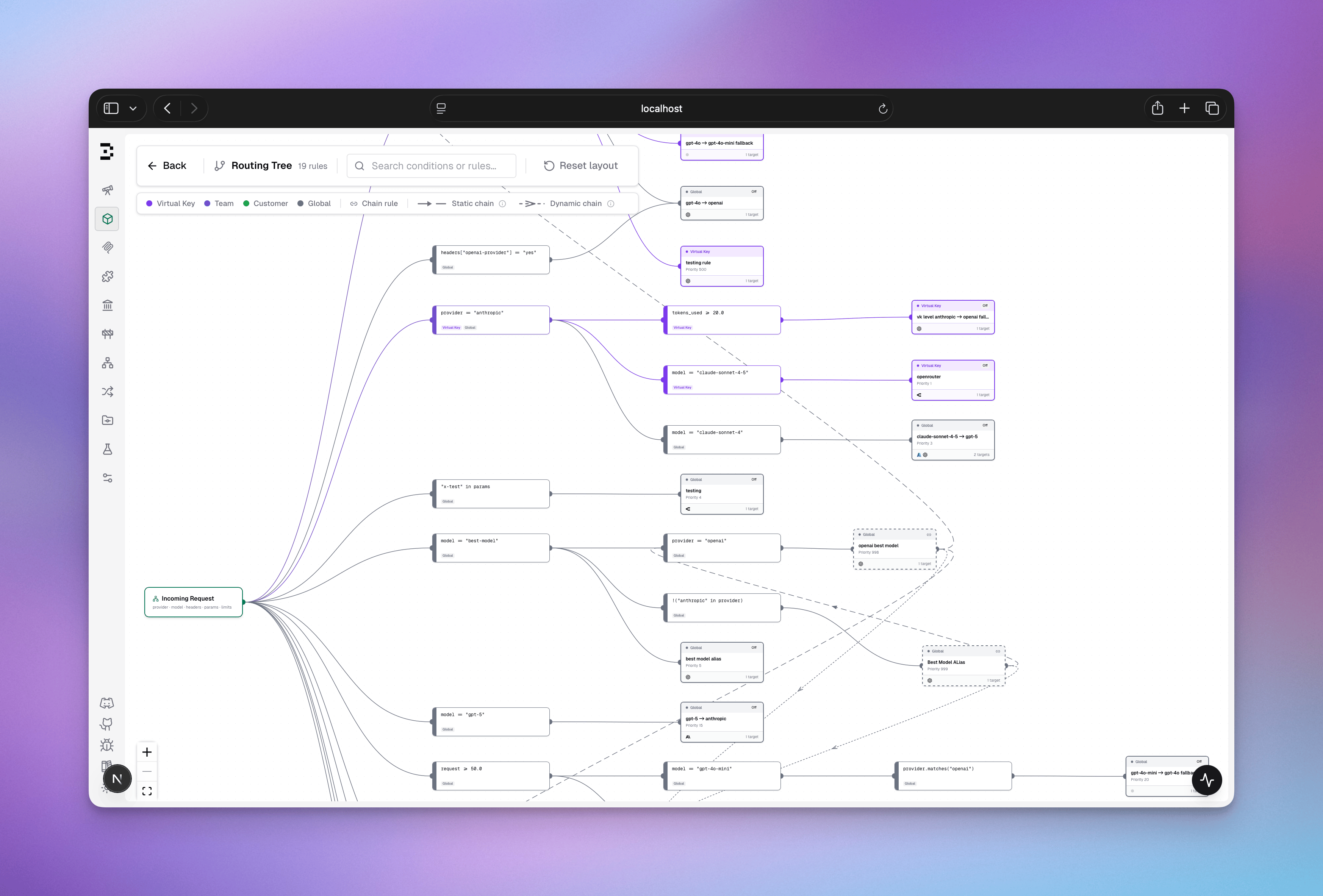 Unlike governance routing (which uses static provider weights), routing rules use **CEL expressions** (Common Expression Language) to evaluate conditions at runtime and make routing decisions dynamically.
***
## How It Works
### Request Flow
Unlike governance routing (which uses static provider weights), routing rules use **CEL expressions** (Common Expression Language) to evaluate conditions at runtime and make routing decisions dynamically.
***
## How It Works
### Request Flow
 ### Scope Hierarchy & Precedence
Routing rules are organized by scope with **first-match-wins** evaluation:
```
VirtualKey Scope (Highest Priority)
↓
Team Scope
↓
Customer Scope
↓
Global Scope (Lowest Priority, applies to all)
```
**How it works:**
1. When a request arrives with a Virtual Key, Bifrost builds a scope chain
2. Rules are evaluated in scope order (highest to lowest)
3. The **first matching rule** wins - no further rules are evaluated in that iteration
4. Within each scope, rules are sorted by **priority** (ascending: 0 evaluates before 10)
5. If the matched rule has `chain_rule: true`, the resolved provider/model becomes the new context and the full scope chain is re-evaluated from the top
6. If no rule matches (or the matched rule is terminal), the current decision is applied
7. If no rule ever matches, the incoming provider/model is used unchanged
**Example:**
```
VirtualKey (vk-123) is attached to Team (team-456),
which belongs to Customer (cust-789)
Evaluation order:
1. Check Virtual Key scope rules (vk-123)
2. Check Team scope rules (team-456)
3. Check Customer scope rules (cust-789)
4. Check Global scope rules
First match → Decision
```
## CEL Expression Guide
### Available Variables
Routing rules evaluate CEL expressions with these available variables:
#### Request Context
```cel theme={null}
model // Requested model (string)
provider // Current provider (string)
request_type // Request type (chat_completion, embedding, batch, image_generation, moderation, transcription, translation)
```
#### Headers & Parameters
```cel theme={null}
headers["header-name"] // Request header (case-insensitive key lookup)
params["param-name"] // Query parameter
```
**Header Examples:**
```cel theme={null}
headers["x-tier"] == "premium"
headers["x-api-version"] == "v2"
headers["user-agent"].contains("mobile")
```
#### Organization Context
```cel theme={null}
virtual_key_id // VK ID (string, empty if no VK)
virtual_key_name // VK name (string)
team_id // Team ID (string, empty if not in team)
team_name // Team name (string)
customer_id // Customer ID (string)
customer_name // Customer name (string)
```
**Organization Examples:**
```cel theme={null}
team_name == "ml-research"
customer_id == "acme-corp"
virtual_key_name.startsWith("prod-")
```
#### Capacity Metrics (as percentages: 0-100)
```cel theme={null}
budget_used // Budget usage percentage for provider/model (0.0 to 100.0)
tokens_used // Token rate limit usage percentage (0.0 to 100.0)
request // Request rate limit usage percentage (0.0 to 100.0)
```
**Capacity Examples:**
```cel theme={null}
budget_used > 80 // Route to fallback when 80%+ of budget used
tokens_used < 50 // Route to fast provider when below 50% token limit
request > 90 // Switch providers when request limit near max
```
#### Complexity Routing
```cel theme={null}
complexity_tier // Automatically-classified request tier: "SIMPLE", "MEDIUM", or "COMPLEX"
```
Bifrost embeds each request and assigns it the tier of its nearest reference phrase before routing rules are evaluated. This lets you route cheap/fast requests to small models and deep reasoning tasks to frontier models with no application-side changes.
If complexity classification is unavailable for a request (classifier not configured or not ready, unsupported input, or a match below the similarity floor), `complexity_tier` is treated as **unknown** by the evaluator — the rule does not match and evaluation falls through. Rules using other variables are unaffected.
**Examples:**
```cel theme={null}
complexity_tier == "COMPLEX" // Only frontier-worthy tasks
complexity_tier in ["MEDIUM", "COMPLEX"] // Medium and above
!(complexity_tier in ["SIMPLE", "MEDIUM"]) // Complex only, negated form
complexity_tier == "COMPLEX" && team_name == "research" // Scoped to a team
```
See [Complexity Router](/features/governance/complexity-router) for how tiers are computed and how to tune the reference phrases and embedding configuration.
#### How Capacity Metrics Are Resolved
Each variable reflects **current usage as a percentage of the configured limit** for the request's provider and model combination. Values above 100 mean the limit is exhausted.
Bifrost resolves which limits to read in this order (most specific first):
1. **Model + provider config** - a budget or rate limit set on a specific `provider/model` pair (e.g., `openai/gpt-4o`)
2. **Model-only config** - a budget or rate limit set on a model name without a provider (matched across all providers)
3. **Global provider config** - a budget or rate limit attached to the provider itself (e.g., all `openai` traffic)
4. **Virtual Key provider config** - a rate limit or budget attached to a provider entry inside the Virtual Key's provider configs
When multiple levels are configured for the same request, **the highest percentage across all matched levels is used**. For example, if the model-only budget is 95% consumed and the global provider budget is 60% consumed, `budget_used` will be `95`.
**If no limit is configured** for the current provider/model, the variable is `0.0` - a rule like `budget_used > 80` will never match.
In [chained rules](#rule-chaining), capacity values are **re-read at every chain step** against the resolved provider/model, so downstream rules always see fresh data.
### CEL Operators & Functions
#### Comparison Operators
```cel theme={null}
== // Equal
!= // Not equal
> // Greater than
< // Less than
>= // Greater or equal
<= // Less or equal
```
#### Logical Operators
```cel theme={null}
&& // AND
|| // OR
! // NOT
```
#### String Functions
```cel theme={null}
.startsWith("prefix") // Check string prefix
.endsWith("suffix") // Check string suffix
.contains("substring") // Check substring
.matches("regex") // Regex match
```
#### Collections
```cel theme={null}
"value" in ["item1", "item2", "item3"] // Check membership
```
### Expression Examples
#### Simple Conditions
```cel theme={null}
// Route based on header value
headers["x-tier"] == "premium"
// Route based on team
team_name == "research"
// Route based on model
model == "gpt-4o"
// Route based on request type
request_type == "embedding"
// Route to fallback when budget high
budget_used > 80
```
#### Complex Conditions (Multiple Criteria)
```cel theme={null}
// Premium tier research team
headers["x-tier"] == "premium" && team_name == "research"
// High capacity or premium
budget_used > 90 || headers["x-priority"] == "high"
// Specific team and model
team_name == "ml-ops" && model.startsWith("claude-")
// Region-based with capacity check
headers["x-region"] == "us-east" && tokens_used < 75
// Route embeddings to cheaper provider
request_type == "embedding" && budget_used > 50
```
#### Pattern Matching
```cel theme={null}
// Match models starting with prefix
model.startsWith("gpt-4")
// Match custom headers
headers["x-environment"] in ["staging", "testing"]
// Email domain matching
headers["x-user-email"].contains("@company.com")
// Regex patterns
headers["x-app-version"].matches("[0-9]+\\.[0-9]+\\.[0-9]+")
```
### Validation & Error Handling
* **Invalid CEL syntax** → Rule logs warning, skipped, evaluation continues
* **Missing header/parameter** → Expression returns false (graceful no-match)
* **Type mismatches** → Logged as warning, rule skipped
* **Empty expression** → Rule always matches (use `true`/`false` for explicit behavior)
***
## Configuration
Access routing rules from the dashboard:
**Routing Rules Dashboard**
### Scope Hierarchy & Precedence
Routing rules are organized by scope with **first-match-wins** evaluation:
```
VirtualKey Scope (Highest Priority)
↓
Team Scope
↓
Customer Scope
↓
Global Scope (Lowest Priority, applies to all)
```
**How it works:**
1. When a request arrives with a Virtual Key, Bifrost builds a scope chain
2. Rules are evaluated in scope order (highest to lowest)
3. The **first matching rule** wins - no further rules are evaluated in that iteration
4. Within each scope, rules are sorted by **priority** (ascending: 0 evaluates before 10)
5. If the matched rule has `chain_rule: true`, the resolved provider/model becomes the new context and the full scope chain is re-evaluated from the top
6. If no rule matches (or the matched rule is terminal), the current decision is applied
7. If no rule ever matches, the incoming provider/model is used unchanged
**Example:**
```
VirtualKey (vk-123) is attached to Team (team-456),
which belongs to Customer (cust-789)
Evaluation order:
1. Check Virtual Key scope rules (vk-123)
2. Check Team scope rules (team-456)
3. Check Customer scope rules (cust-789)
4. Check Global scope rules
First match → Decision
```
## CEL Expression Guide
### Available Variables
Routing rules evaluate CEL expressions with these available variables:
#### Request Context
```cel theme={null}
model // Requested model (string)
provider // Current provider (string)
request_type // Request type (chat_completion, embedding, batch, image_generation, moderation, transcription, translation)
```
#### Headers & Parameters
```cel theme={null}
headers["header-name"] // Request header (case-insensitive key lookup)
params["param-name"] // Query parameter
```
**Header Examples:**
```cel theme={null}
headers["x-tier"] == "premium"
headers["x-api-version"] == "v2"
headers["user-agent"].contains("mobile")
```
#### Organization Context
```cel theme={null}
virtual_key_id // VK ID (string, empty if no VK)
virtual_key_name // VK name (string)
team_id // Team ID (string, empty if not in team)
team_name // Team name (string)
customer_id // Customer ID (string)
customer_name // Customer name (string)
```
**Organization Examples:**
```cel theme={null}
team_name == "ml-research"
customer_id == "acme-corp"
virtual_key_name.startsWith("prod-")
```
#### Capacity Metrics (as percentages: 0-100)
```cel theme={null}
budget_used // Budget usage percentage for provider/model (0.0 to 100.0)
tokens_used // Token rate limit usage percentage (0.0 to 100.0)
request // Request rate limit usage percentage (0.0 to 100.0)
```
**Capacity Examples:**
```cel theme={null}
budget_used > 80 // Route to fallback when 80%+ of budget used
tokens_used < 50 // Route to fast provider when below 50% token limit
request > 90 // Switch providers when request limit near max
```
#### Complexity Routing
```cel theme={null}
complexity_tier // Automatically-classified request tier: "SIMPLE", "MEDIUM", or "COMPLEX"
```
Bifrost embeds each request and assigns it the tier of its nearest reference phrase before routing rules are evaluated. This lets you route cheap/fast requests to small models and deep reasoning tasks to frontier models with no application-side changes.
If complexity classification is unavailable for a request (classifier not configured or not ready, unsupported input, or a match below the similarity floor), `complexity_tier` is treated as **unknown** by the evaluator — the rule does not match and evaluation falls through. Rules using other variables are unaffected.
**Examples:**
```cel theme={null}
complexity_tier == "COMPLEX" // Only frontier-worthy tasks
complexity_tier in ["MEDIUM", "COMPLEX"] // Medium and above
!(complexity_tier in ["SIMPLE", "MEDIUM"]) // Complex only, negated form
complexity_tier == "COMPLEX" && team_name == "research" // Scoped to a team
```
See [Complexity Router](/features/governance/complexity-router) for how tiers are computed and how to tune the reference phrases and embedding configuration.
#### How Capacity Metrics Are Resolved
Each variable reflects **current usage as a percentage of the configured limit** for the request's provider and model combination. Values above 100 mean the limit is exhausted.
Bifrost resolves which limits to read in this order (most specific first):
1. **Model + provider config** - a budget or rate limit set on a specific `provider/model` pair (e.g., `openai/gpt-4o`)
2. **Model-only config** - a budget or rate limit set on a model name without a provider (matched across all providers)
3. **Global provider config** - a budget or rate limit attached to the provider itself (e.g., all `openai` traffic)
4. **Virtual Key provider config** - a rate limit or budget attached to a provider entry inside the Virtual Key's provider configs
When multiple levels are configured for the same request, **the highest percentage across all matched levels is used**. For example, if the model-only budget is 95% consumed and the global provider budget is 60% consumed, `budget_used` will be `95`.
**If no limit is configured** for the current provider/model, the variable is `0.0` - a rule like `budget_used > 80` will never match.
In [chained rules](#rule-chaining), capacity values are **re-read at every chain step** against the resolved provider/model, so downstream rules always see fresh data.
### CEL Operators & Functions
#### Comparison Operators
```cel theme={null}
== // Equal
!= // Not equal
> // Greater than
< // Less than
>= // Greater or equal
<= // Less or equal
```
#### Logical Operators
```cel theme={null}
&& // AND
|| // OR
! // NOT
```
#### String Functions
```cel theme={null}
.startsWith("prefix") // Check string prefix
.endsWith("suffix") // Check string suffix
.contains("substring") // Check substring
.matches("regex") // Regex match
```
#### Collections
```cel theme={null}
"value" in ["item1", "item2", "item3"] // Check membership
```
### Expression Examples
#### Simple Conditions
```cel theme={null}
// Route based on header value
headers["x-tier"] == "premium"
// Route based on team
team_name == "research"
// Route based on model
model == "gpt-4o"
// Route based on request type
request_type == "embedding"
// Route to fallback when budget high
budget_used > 80
```
#### Complex Conditions (Multiple Criteria)
```cel theme={null}
// Premium tier research team
headers["x-tier"] == "premium" && team_name == "research"
// High capacity or premium
budget_used > 90 || headers["x-priority"] == "high"
// Specific team and model
team_name == "ml-ops" && model.startsWith("claude-")
// Region-based with capacity check
headers["x-region"] == "us-east" && tokens_used < 75
// Route embeddings to cheaper provider
request_type == "embedding" && budget_used > 50
```
#### Pattern Matching
```cel theme={null}
// Match models starting with prefix
model.startsWith("gpt-4")
// Match custom headers
headers["x-environment"] in ["staging", "testing"]
// Email domain matching
headers["x-user-email"].contains("@company.com")
// Regex patterns
headers["x-app-version"].matches("[0-9]+\\.[0-9]+\\.[0-9]+")
```
### Validation & Error Handling
* **Invalid CEL syntax** → Rule logs warning, skipped, evaluation continues
* **Missing header/parameter** → Expression returns false (graceful no-match)
* **Type mismatches** → Logged as warning, rule skipped
* **Empty expression** → Rule always matches (use `true`/`false` for explicit behavior)
***
## Configuration
Access routing rules from the dashboard:
**Routing Rules Dashboard**
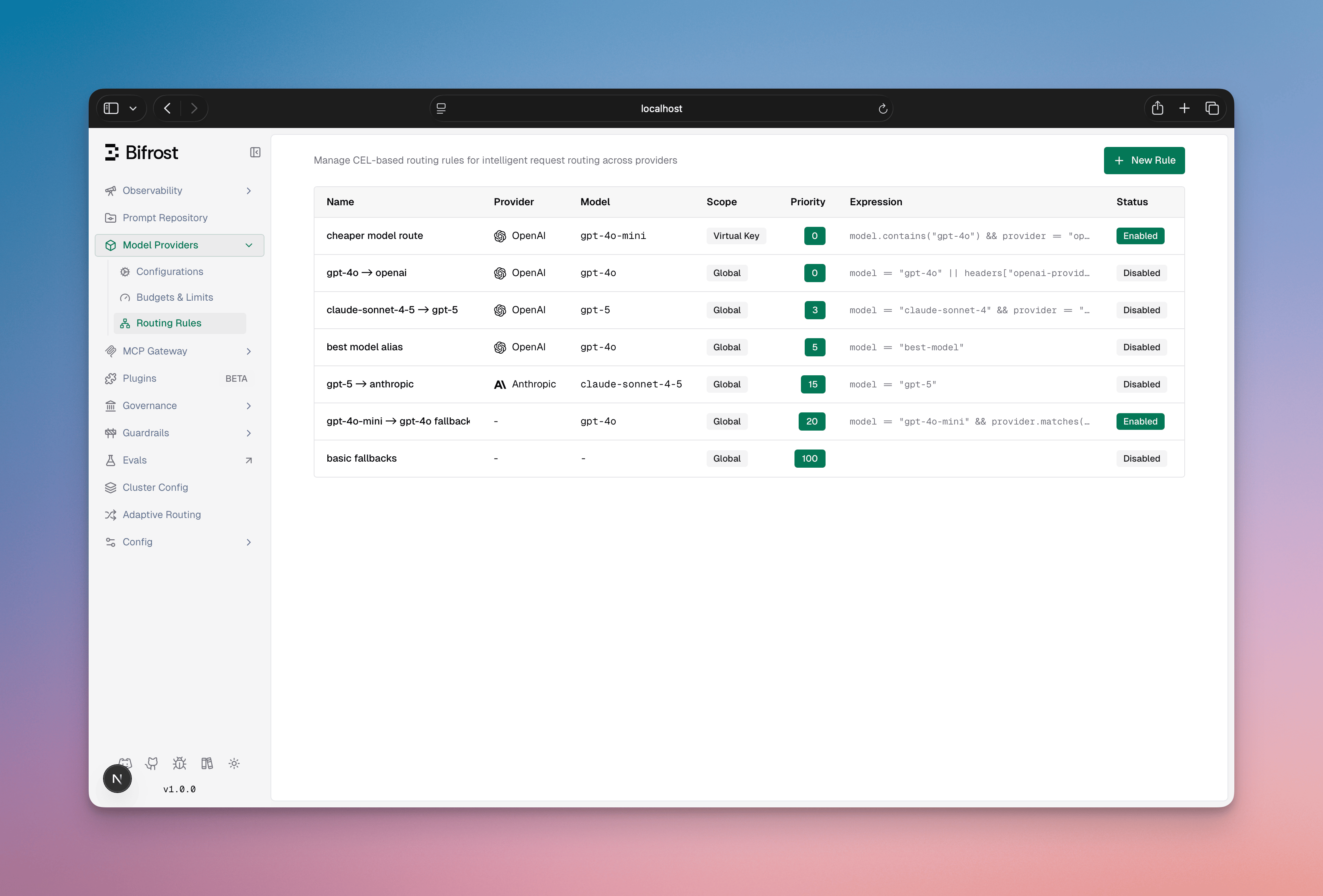 **Features:**
* List all rules with scope, priority, and enabled status
* Filter by scope or scope\_id
* Create/Edit/Delete rules
* View rule expressions and targets
* Enable/disable rules without deletion
* Drag to reorder priority
**Create/Edit Rule Sheet**
**Features:**
* List all rules with scope, priority, and enabled status
* Filter by scope or scope\_id
* Create/Edit/Delete rules
* View rule expressions and targets
* Enable/disable rules without deletion
* Drag to reorder priority
**Create/Edit Rule Sheet**
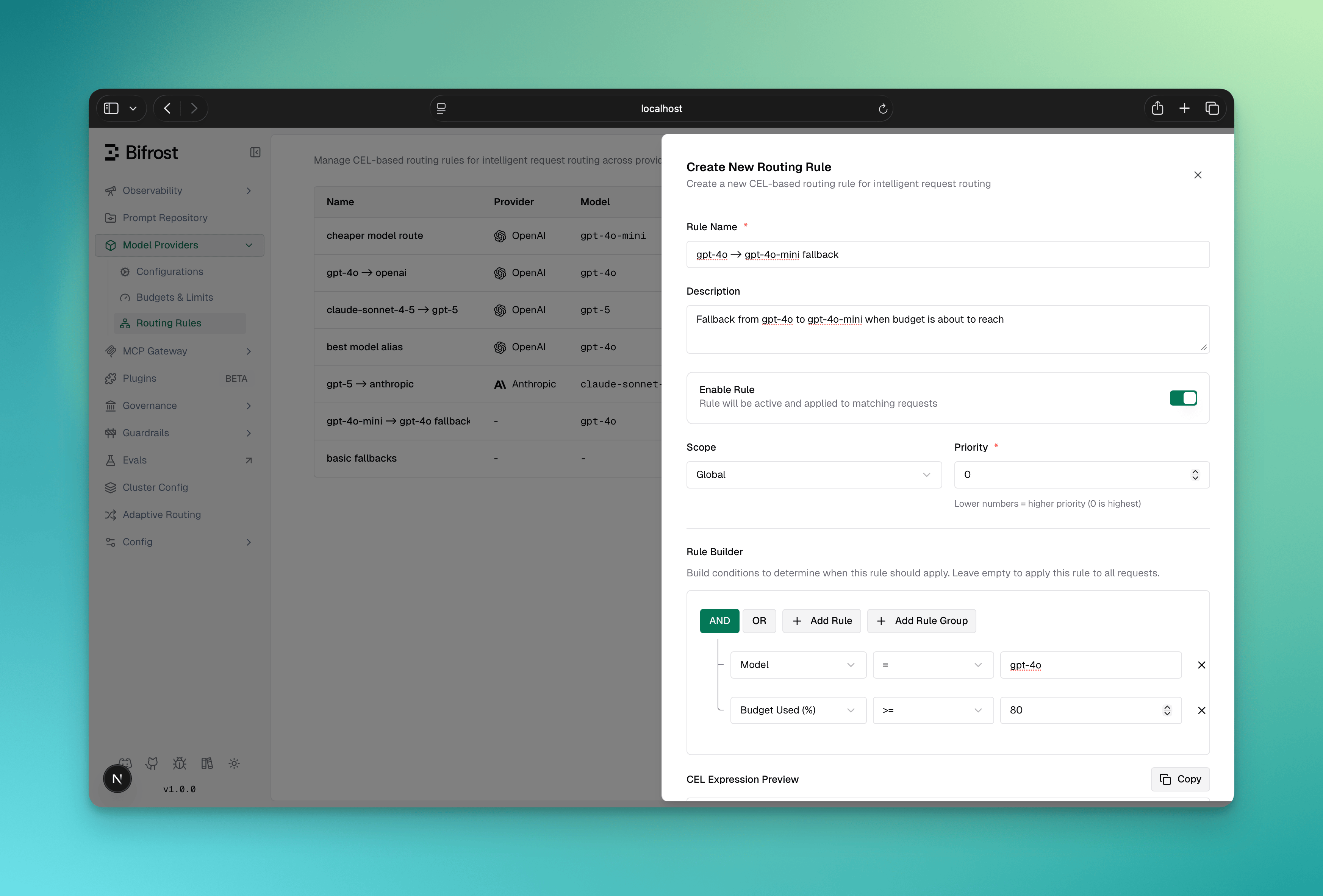 **Fields:**
* **Name** (required): Unique rule identifier
* **Description** (optional): Internal notes
* **Enabled**: Toggle rule on/off
* **Chain Rule**: When enabled, the routing engine re-evaluates all rules after this one matches, using the resolved provider/model as the new context. See [Rule Chaining](#rule-chaining).
* **CEL Expression**: Visual or manual expression builder
* **Targets** (required): One or more weighted routing targets - each has Provider (optional), Model (optional), API Key (optional, requires Provider to be set), and Weight (%). Weights must sum to 1. When multiple targets are defined, one is selected probabilistically at request time.
* **Fallbacks** (optional): Array of fallback providers
* **Scope**: Where rule applies (global, customer, team, virtual\_key)
* **Scope ID**: Required if scope is not global
* **Priority**: Lower = evaluated first (default: 0)
### Visual CEL Builder
The dashboard includes a visual query builder for CEL expressions:
* **Condition Builder**: Select field, operator, value
* **Logical Operators**: Combine conditions with AND/OR
* **Manual Mode**: Switch to edit CEL directly
* **Validation**: Real-time syntax validation
* **Conversion**: Auto-converts visual rules to CEL
The `/api/routing/*` endpoints are available in **Bifrost v2.0.0 and above**. On earlier versions use the `/api/governance/*` paths.
These endpoints moved to `/api/routing/*` when routing became its own plugin. The previous
`/api/governance/*` paths still work and behave identically, so existing scripts keep
running, but they are deprecated and new integrations should use the paths shown here.
### List Routing Rules
```bash theme={null}
GET /api/routing/rules
# Optional query parameters:
?scope=global&scope_id=&from_memory=true
```
**Response:**
```json theme={null}
{
"rules": [
{
"id": "rule-uuid-123",
"name": "Premium Tier Route",
"description": "Route premium users to fast provider",
"enabled": true,
"chain_rule": false,
"cel_expression": "headers[\"x-tier\"] == \"premium\"",
"targets": [
{ "provider": "openai", "model": "gpt-4o", "weight": 0.7 },
{ "provider": "azure", "model": "gpt-4o", "weight": 0.3 }
],
"fallbacks": ["groq/gpt-3.5-turbo"],
"scope": "global",
"scope_id": null,
"priority": 10,
"created_at": "2024-01-15T10:30:00Z",
"updated_at": "2024-01-15T10:30:00Z"
}
],
"count": 1
}
```
### Get Single Rule
```bash theme={null}
GET /api/routing/rules/{rule_id}
```
### Create Rule
```bash theme={null}
POST /api/routing/rules
Content-Type: application/json
```
**Request Body:**
```json theme={null}
{
"name": "Budget Overflow Route",
"description": "When budget is high, route to cheaper provider",
"enabled": true,
"cel_expression": "budget_used > 85",
"targets": [
{ "provider": "groq", "weight": 1 }
],
"fallbacks": ["openai/gpt-4o"],
"scope": "team",
"scope_id": "team-uuid-456",
"priority": 5
}
```
**Response:** `201 Created`
```json theme={null}
{
"message": "Routing rule created successfully",
"rule": { /* rule object */ }
}
```
### Update Rule
```bash theme={null}
PUT /api/routing/rules/{rule_id}
Content-Type: application/json
```
**Request Body (all fields optional):**
```json theme={null}
{
"name": "Updated Rule Name",
"enabled": false,
"cel_expression": "budget_used > 90",
"priority": 20
}
```
### Delete Rule
```bash theme={null}
DELETE /api/routing/rules/{rule_id}
```
**Response:** `200 OK`
```json theme={null}
{
"message": "Routing rule deleted successfully"
}
```
Define routing rules in your `config.json` file under the governance configuration:
**Structure:**
```json theme={null}
{
"governance": {
"routing_rules": [
{
"id": "rule-uuid-123",
"name": "Premium Tier Route",
"description": "Route premium users to fast provider",
"enabled": true,
"cel_expression": "headers[\"x-tier\"] == \"premium\"",
"targets": [
{ "provider": "openai", "model": "gpt-4o", "weight": 0.7 },
{ "provider": "azure", "model": "gpt-4o", "weight": 0.3 }
],
"fallbacks": ["groq/gpt-3.5-turbo"],
"scope": "global",
"scope_id": null,
"priority": 10
},
{
"id": "rule-uuid-456",
"name": "Budget Overflow Route",
"description": "Route to cheaper provider when budget is high",
"enabled": true,
"cel_expression": "budget_used > 85",
"targets": [
{ "provider": "groq", "model": "llama-2-70b", "weight": 1 }
],
"fallbacks": [],
"scope": "team",
"scope_id": "team-ml-ops",
"priority": 5
}
]
}
}
```
**Fields:**
* **id** (string, auto-generated): Unique rule identifier (UUID)
* **name** (string, required): Rule name (must be unique within scope)
* **description** (string, optional): Internal documentation
* **enabled** (boolean): Whether rule is active
* **chain\_rule** (boolean, default: `false`): When `true`, re-evaluates the full routing chain after this rule matches, using the resolved provider/model as the new context. See [Rule Chaining](#rule-chaining).
* **cel\_expression** (string): CEL expression for rule matching
* **targets** (array, required): One or more routing targets. Each target has:
* `provider` (string, optional): Target provider - omit to use the incoming request provider
* `model` (string, optional): Target model - omit to use the incoming request model
* `key_id` (string, optional): UUID of the API key to pin - requires `provider` to be present; omit for load-balanced key selection
* `weight` (number, required): Probability weight - all weights in a rule must sum to 1 (e.g. 0.7 + 0.3 = 1.0)
* **fallbacks** (array, optional): Ordered fallback chain, tried after every target fails. Each entry is either the string `"provider/model"` (use `"provider/"` to keep the incoming model), or an object:
* `provider` (string, required): Fallback provider
* `model` (string, optional): Fallback model - omit to use the incoming request model
* `key_id` (string, optional): UUID of the API key to pin - omit for load-balanced key selection. In `config.json` use `provider_key_name` instead, which resolves to a key ID at load time. A fallback whose pinned key is missing from that provider's pool is skipped, and the chain moves on
* **scope** (string): Scope level - "global", "customer", "team", or "virtual\_key"
* **scope\_id** (string, optional): ID of scoped entity (null for global scope)
* **priority** (number): Rule evaluation order within scope (lower = evaluated first)
**Loading from config.json:**
Routes are automatically loaded on startup from the `config.json` governance section. Changes require application restart.
**Example with Multiple Rules:**
```json theme={null}
{
"governance": {
"routing_rules": [
{
"id": "tier-based",
"name": "Premium Tier Fast Track",
"enabled": true,
"cel_expression": "headers[\"x-tier\"] == \"premium\"",
"targets": [
{ "provider": "openai", "model": "gpt-4o", "weight": 1 }
],
"fallbacks": ["azure/gpt-4o"],
"scope": "global",
"priority": 0
},
{
"id": "capacity-failover",
"name": "Budget Exhaustion Fallback",
"enabled": true,
"cel_expression": "budget_used > 90",
"targets": [
{ "provider": "groq", "model": "llama-2-70b", "weight": 1 }
],
"fallbacks": [],
"scope": "global",
"priority": 5
},
{
"id": "team-preference",
"name": "ML Team Anthropic Route",
"enabled": true,
"cel_expression": "team_name == \"ml-research\"",
"targets": [
{ "provider": "anthropic", "model": "claude-3-opus-20240229", "weight": 1 }
],
"fallbacks": ["bedrock/claude-3-opus"],
"scope": "team",
"scope_id": "team-ml-research",
"priority": 0
}
]
}
}
```
***
## Real-World Use Cases
**When to use Routing Rules:**
* Dynamic routing based on request headers or parameters
* Capacity-based routing (route to fallback when budget/rate limit is high)
* Organization-based routing (different rules for different teams/customers)
* A/B testing or canary deployments
* Conditional provider override based on complex logic
### Use Case 1: Tier-Based Routing
Route requests based on customer tier using headers:
```json theme={null}
{
"name": "Premium Tier Fast Track",
"cel_expression": "headers[\"x-tier\"] == \"premium\"",
"targets": [
{ "provider": "openai", "model": "gpt-4o", "weight": 1 }
],
"fallbacks": ["azure/gpt-4o"],
"scope": "global",
"priority": 10
}
```
### Use Case 2: Capacity-Based Failover
Route to cheaper provider when budget is exhausted:
```json theme={null}
{
"name": "Budget Exhaustion Fallback",
"cel_expression": "budget_used > 90",
"targets": [
{ "provider": "groq", "model": "llama-2-70b", "weight": 1 }
],
"fallbacks": [],
"scope": "global",
"priority": 5
}
```
### Use Case 3: Team-Specific Routing
Route team-specific requests to their preferred provider:
```json theme={null}
{
"name": "ML Team Anthropic Preference",
"cel_expression": "team_name == \"ml-research\"",
"targets": [
{ "provider": "anthropic", "model": "claude-3-opus-20240229", "weight": 1 }
],
"fallbacks": ["bedrock/claude-3-opus"],
"scope": "team",
"scope_id": "team-ml-research-uuid",
"priority": 0
}
```
### Use Case 4: Complex Multi-Condition Routing
Combine multiple criteria for sophisticated routing:
```json theme={null}
{
"name": "Production Premium Route",
"cel_expression": "headers[\"x-environment\"] == \"production\" && headers[\"x-priority\"] == \"high\" && tokens_used < 75",
"targets": [
{ "provider": "openai", "model": "gpt-4o", "weight": 1 }
],
"fallbacks": ["azure/gpt-4o"],
"scope": "global",
"priority": 5
}
```
### Use Case 5: Probabilistic A/B Testing
Split traffic across providers or models by weight for canary deployments or cost optimization:
```json theme={null}
{
"name": "Split Traffic OpenAI vs Groq",
"cel_expression": "true",
"targets": [
{ "provider": "openai", "model": "gpt-4o", "weight": 0.7 },
{ "provider": "groq", "model": "llama-3.1-70b", "weight": 0.3 }
],
"scope": "global",
"priority": 15
}
```
Each request matching this rule has a 70% chance of going to OpenAI and a 30% chance of going to Groq. Weights must always sum to 1.
### Use Case 6: Regional Routing
Route based on region headers:
```json theme={null}
{
"name": "EU Data Residency",
"cel_expression": "headers[\"x-region\"] == \"eu\"",
"targets": [
{ "provider": "azure", "model": "gpt-4o", "weight": 1 }
],
"fallbacks": [],
"scope": "global",
"priority": 0
}
```
***
## Rule Chaining
Rule chaining is available in **Bifrost v1.5.0-prerelease2 and above**.
Rule chaining allows routing rules to be composed together. When a rule has `chain_rule: true`, the routing engine does not stop after it matches - instead, it updates the request context with the resolved provider/model and re-evaluates the full rule set from the top.
### How Chaining Works
```
Request arrives (provider=openai, model=gpt-4)
↓
Rule 1 matches (chain_rule=true) → resolves model to gpt-4-turbo
↓
Re-evaluate all rules with (provider=openai, model=gpt-4-turbo)
↓
Rule 2 matches (chain_rule=false) → resolves provider to azure
↓
Final decision: azure / gpt-4-turbo
```
### Termination Conditions
The chain stops when any of the following occurs:
| Condition | Description |
| - | - |
| **No match** | Current iteration finds no matching rule |
| **Terminal rule** | Matched rule has `chain_rule: false` (the default) |
| **Convergence** | Provider and model are unchanged after a chain step - continuing would loop forever |
### Decision Accumulation
Each chain step overwrites the previous decision - the last matched rule wins for all fields:
| Field | Strategy |
| - | - |
| Provider | Last matched rule's target |
| Model | Last matched rule's target |
| API Key | Last matched rule's target (empty = use pool) |
| Fallbacks | Last matched rule's fallbacks |
Every chain step is logged in the routing engine audit trail for full observability.
### Configuration Example
```json theme={null}
{
"governance": {
"routing_rules": [
{
"id": "normalize-alias",
"name": "Normalize gpt-4 Alias",
"enabled": true,
"chain_rule": true,
"cel_expression": "model == \"gpt-4\"",
"targets": [{ "model": "gpt-4-turbo", "weight": 1 }],
"scope": "global",
"priority": 0
},
{
"id": "route-gpt4-turbo",
"name": "Route gpt-4-turbo to Azure",
"enabled": true,
"chain_rule": false,
"cel_expression": "model == \"gpt-4-turbo\"",
"targets": [{ "provider": "azure", "model": "gpt-4-turbo", "weight": 1 }],
"scope": "global",
"priority": 1
}
]
}
}
```
**Result:** A request with `model=gpt-4` is normalized to `gpt-4-turbo` by Rule 1 (chain continues), then routed to Azure by Rule 2 (chain stops).
### Use Cases
* **Model alias normalization**: Rewrite short aliases to canonical model names before routing
* **Tiered policy application**: Apply a team-level override first, then a global key-pinning rule
* **Feature flag injection**: A chain rule sets the target to an experimental model; a downstream rule routes that model to the right provider
* **Budget-aware escalation**: A chain rule downgrades the model when budget is high; the next rule routes the downgraded model appropriately
### Best Practices
* Keep chains short (2–3 steps) - long chains are harder to reason about
* Ensure the last rule in every intended chain path is terminal (`chain_rule: false`) to prevent unintended continuation
* Use convergence detection as a safety net, not a primary termination strategy - if you rely on it, your rules likely have a logic gap
* Name chain rules clearly to reflect their role: "Normalize X", "Enrich context", etc.
***
## Integration with Governance & Load Balancing
### Interaction with Governance Routing
Routing Rules run **BEFORE** governance provider selection and can override it:
**If a routing rule matches:**
```
1. Routing Rules → CEL expression evaluation (first-match-wins)
2. Rule matches → target selected probabilistically from targets array
3. provider/model/key_id/fallbacks overridden from selected target
4. Governance provider_configs → SKIPPED
5. Load Balancing → selects best key (unless key_id was pinned)
```
**If no routing rule matches:**
```
1. Routing Rules → CEL expression evaluation
2. No match → continue
3. Governance routing → provider/model selection (weighted random)
4. Load Balancing → selects best key
```
**Example:**
* Governance configures: 70% Azure, 30% OpenAI
* Routing rule exists: `budget_used > 85 → groq`
* Request arrives with budget\_used = 90%
* **Result**: Groq selected by routing rule, governance provider\_configs **ignored**
### Interaction with Load Balancing
Routing rules determine provider BEFORE adaptive load balancing runs:
```
1. Routing Rules evaluate first → determine provider (if matched)
OR
2. Governance selects provider (if no routing rule matched)
↓
3. Load Balancing Level 1 → skipped (provider already determined by routing rules or governance)
4. Load Balancing Level 2 → key selection (performance-based within selected provider)
```
**Key Insight:** Load balancing Level 2 (key selection) always runs regardless of whether the provider was determined by routing rules or governance. This means you get automatic key-level optimization in all cases.
### Fallback Chain
Routing rules can define fallbacks that flow into load balancing:
```json theme={null}
{
"provider": "openai",
"fallbacks": ["azure/gpt-4o", "groq/gpt-3.5-turbo"]
}
```
If OpenAI fails:
1. Level 2 load balancing evaluates Azure keys
2. If all Azure keys fail, tries Groq
A fallback can pin its own provider key, which skips load balancing for that attempt:
```json theme={null}
{
"provider": "openai",
"fallbacks": [
"azure/gpt-4o",
{ "provider": "vertex", "model": "gemini-2.5-pro", "key_id": "8f3c1d2e-..." }
]
}
```
Each attempt is pinned independently, so an unpinned fallback later in the chain still load balances normally. If the pinned key is not in that provider's pool, the attempt is skipped and the chain moves to the next entry.
A pin stays with its provider when [session affinity](/providers/session-affinity) reorders the chain. A session that moves the primary to another provider carries the target's pin onto that provider's fallback entry, and a fallback the session promotes brings its own pin to the primary attempt.
***
## Execution & Performance
### CEL Compilation
* **First evaluation**: CEL expression is compiled into a bytecode program
* **Subsequent evaluations**: Program is cached and reused
* **Performance**: Cached program evaluation is very fast (microseconds)
* **Memory**: Compiled programs cached in memory until Bifrost restart
### Priority & Ordering
Rules within the same scope are evaluated in **ascending priority order**:
```
Priority 0 → Priority 5 → Priority 10 → Priority 100 (first match wins)
```
**Best Practice:** Use priority 0-10 for critical rules, 100+ for fallbacks.
### Optimization Tips
1. **Order rules by likelihood**: Put frequently matching rules first
2. **Use specific scopes**: Avoid global scope when possible (narrower = faster)
3. **Avoid expensive string operations**: Prefer `==` over `.matches()` with regex
4. **Keep expressions simple**: Complex conditions increase evaluation time
5. **Use reasonable priorities**: Gaps in priorities (0, 10, 20) make reordering easy
***
## Best Practices
✅ **Good names:**
* "Premium Tier Fast Track"
* "Budget Exhaustion Fallback"
* "ML Team Anthropic Route"
* "Production High Priority Route"
❌ **Bad names:**
* "Rule 1"
* "Fix"
* "Temp"
* "TODO"
✅ **Safe patterns:**
```cel theme={null}
headers["x-tier"] == "premium" // Exact match
headers["x-region"] in ["us", "eu", "asia"] // Membership
team_name.startsWith("prod-") // Prefix check
budget_used > 80 // Numeric comparison
```
❌ **Risky patterns:**
```cel theme={null}
headers["x-tier"].matches(".*premium.*") // Complex regex
headers["x-config"].contains("json") // Fragile
model.length() > 5 && ... // Undocumented behavior
```
✅ **Good scope design:**
* Global rules for organization-wide policies
* Customer scope for compliance (EU, data residency)
* Team scope for team preferences
* Virtual Key scope for specific integrations
❌ **Avoid:**
* Too many virtual key-level rules (maintenance nightmare)
* Conflicting rules across scopes
* Rules that duplicate governance routing
✅ **Validate before deployment:**
1. Test CEL expression with expected headers
2. Verify provider/model exist in your setup
3. Check fallbacks are valid providers
4. Confirm scope\_id matches actual entity
5. Test with `from_memory=true` to verify in-memory state
❌ **Don't:**
* Deploy rules without testing
* Use nonexistent providers
* Create circular fallback chains
✅ **Track rule usage:**
* Log which rules match (logged in Bifrost logs as `[RoutingEngine]`)
* Monitor routing decisions by scope
* Alert on unexpected provider selection patterns
* Review priority order occasionally
❌ **Don't forget:**
* Disabling unused rules (instead of deleting)
* Updating documentation when rules change
* Testing failover chains
***
## Troubleshooting
### Rule Not Matching
**Symptom**: Rule expression is correct but doesn't match
**Diagnosis**:
1. Check if rule is **enabled** (`enabled: true`)
2. Verify **scope matches** (check VirtualKey's team/customer hierarchy)
3. Check rule **priority** vs other rules in scope (lower priority evaluates first)
4. Verify **variable values**: Use `from_memory=true` to debug
**Solutions**:
```bash theme={null}
# Get current routing rules in memory
GET /api/routing/rules?from_memory=true
# Check if your variables are present
# Example: Is team_name actually set?
# Verify headers are lowercase in CEL
```
### Expression Compilation Error
**Symptom**: "Failed to compile rule: invalid CEL syntax"
**Common causes**:
* Unclosed quotes: `headers["x-tier` (missing closing quote)
* Invalid operators: `headers["x"] ??` (not standard CEL)
* String escaping: `headers["x-\type"]` (incorrect escape)
**Solutions**:
1. Use the visual CEL builder to avoid syntax errors
2. Test expressions incrementally
3. Check CEL operator documentation above
4. Wrap complex expressions in parentheses: `(A && B) || (C && D)`
### Wrong Provider Selected
**Symptom**: Request routed to unexpected provider
**Diagnosis**:
1. Multiple rules matching? (first-match-wins means earlier rules take precedence)
2. Governance routing already determined provider? (check scope hierarchy)
3. Load balancing changed key? (rule sets provider, LB sets key)
**Solutions**:
1. Lower priority of matching rules
2. Verify scope precedence (VirtualKey > Team > Customer > Global)
3. Check if another rule has lower priority and matches first
4. Review logs: `[RoutingEngine] Rule matched! Decision: provider=...`
### Header/Parameter Not Found
**Symptom**: "no such key" error in CEL evaluation
**This is normal!** Bifrost treats missing headers as non-matches:
```cel theme={null}
headers["x-optional"] == "value" # Returns false if header missing
```
If you need to check if header exists:
```cel theme={null}
headers["x-optional"] != "" # True only if present and non-empty
```
### Debugging with Logs
Enable debug logging to see routing rule evaluation:
```
[RoutingEngine] Starting rule evaluation for provider=openai, model=gpt-4o
[RoutingEngine] Scope chain: [virtual_key(vk-123) team(team-456) customer(cust-789) global]
[RoutingEngine] Evaluating scope=virtual_key, scopeID=vk-123, ruleCount=2
[RoutingEngine] Evaluating rule: id=rule-1, name=Premium Route, expression=headers["x-tier"]=="premium"
[RoutingEngine] Rule rule-1 evaluation result: matched=false
[RoutingEngine] Evaluating rule: id=rule-2, name=Budget Fallback, expression=budget_used>80
[RoutingEngine] Rule rule-2 evaluation result: matched=true
[RoutingEngine] Rule matched! Selected target: provider=groq, model=gpt-3.5-turbo (weight=1), fallbacks=[azure/gpt-4o]
```
### Routing Stops Working After a Downgrade
This only affects a downgrade across the release that added key-pinned fallbacks, and only when a rule has a `key_id` (or, in `config.json`, a `provider_key_name`) on a fallback.
* OSS: rolling back from 2.2.3 or later to 2.2.2 or earlier
* Enterprise: rolling back from v2.2.3 or later to v2.2.2 or earlier
Staying on either side of that line, or downgrading with no pinned fallback in any rule, is unaffected.
**Symptom**: After the rollback, the log shows `failed to load plugin routing` at startup, the routing plugin reports an error status, and `GET /api/routing/rules` returns 500. If the pinned fallback is in `config.json` rather than the database, Bifrost exits at startup with `failed to unmarshal config` instead.
**Cause**: Since 2.2.3, a fallback with a pinned key is a JSON object, both in `config.json` and in the `fallbacks` column of the `routing_rules` table. Earlier versions only decode string entries. In the database, the decode fails for the whole row, and because rules load in one query, that single row takes every routing rule down with it, including rules that never had a pinned fallback. In `config.json`, the decode fails for the whole file.
**Solution**: Rewrite each object entry back to its `"provider/model"` string, then restart Bifrost. The pinned key is dropped, so that fallback goes back to load-balanced key selection. Every other entry is left as it is.
If `config.json` defines routing rules, edit the file first: replace each fallback object under `governance.routing_rules[].fallbacks` with its `"provider/model"` string. Then run the statement for your config store backend once against the database; rows without an object entry are not touched.
```sql theme={null}
UPDATE routing_rules
SET fallbacks = (
SELECT jsonb_agg(
CASE jsonb_typeof(e.value)
WHEN 'object' THEN to_jsonb((e.value ->> 'provider') || '/' || COALESCE(e.value ->> 'model', ''))
ELSE e.value
END
ORDER BY e.ord
)::text
FROM jsonb_array_elements(routing_rules.fallbacks::jsonb) WITH ORDINALITY AS e(value, ord)
)
WHERE fallbacks IS NOT NULL
AND EXISTS (
SELECT 1 FROM jsonb_array_elements(routing_rules.fallbacks::jsonb) AS e
WHERE jsonb_typeof(e.value) = 'object'
);
```
```sql theme={null}
UPDATE routing_rules
SET fallbacks = (
SELECT json_group_array(entry)
FROM (
SELECT CASE e.type
WHEN 'object' THEN json_extract(e.value, '$.provider') || '/' || COALESCE(json_extract(e.value, '$.model'), '')
ELSE e.value
END AS entry
FROM json_each(routing_rules.fallbacks) AS e
ORDER BY e.key
)
)
WHERE fallbacks IS NOT NULL
AND EXISTS (
SELECT 1 FROM json_each(routing_rules.fallbacks) AS e WHERE e.type = 'object'
);
```
A fallback object without a `model` becomes `"provider/"`, which keeps the incoming model, the same as the string form. Back up the database before running the update. If you upgrade again later, pin the key on those fallbacks a second time through the API or UI.
***
## API Reference
### Request/Response Examples
#### Create Capacity-Based Rule
```bash theme={null}
curl -X POST http://localhost:8080/api/routing/rules \
-H "Content-Type: application/json" \
-d '{
"name": "High Budget Fallback",
"description": "Switch to cheaper provider when budget >85%",
"enabled": true,
"cel_expression": "budget_used > 85",
"targets": [
{ "provider": "groq", "model": "llama-2-70b", "weight": 1 }
],
"fallbacks": ["openai/gpt-3.5-turbo"],
"scope": "global",
"priority": 10
}'
```
#### Create Probabilistic Split Rule
```bash theme={null}
curl -X POST http://localhost:8080/api/routing/rules \
-H "Content-Type: application/json" \
-d '{
"name": "Premium Tier Split",
"cel_expression": "headers[\"x-tier\"] == \"premium\"",
"targets": [
{ "provider": "openai", "model": "gpt-4o", "weight": 0.7 },
{ "provider": "azure", "model": "gpt-4o", "weight": 0.3 }
],
"scope": "global",
"priority": 5
}'
```
#### Create Rule with Pinned API Key
```bash theme={null}
curl -X POST http://localhost:8080/api/routing/rules \
-H "Content-Type: application/json" \
-d '{
"name": "Pin Production Key for Premium Tier",
"description": "Always use the dedicated production key for premium requests",
"enabled": true,
"cel_expression": "headers[\"x-tier\"] == \"premium\"",
"targets": [
{
"provider": "openai",
"model": "gpt-4o",
"key_id": "a1b2c3d4-e5f6-7890-abcd-ef1234567890",
"weight": 1
}
],
"scope": "global",
"priority": 5
}'
```
#### List Rules by Team Scope
```bash theme={null}
curl http://localhost:8080/api/routing/rules \
-H "Authorization: Bearer your-token" \
-G \
--data-urlencode "scope=team" \
--data-urlencode "scope_id=team-uuid-123"
```
#### Get In-Memory Rules (Debug)
```bash theme={null}
curl http://localhost:8080/api/routing/rules?from_memory=true \
-H "Authorization: Bearer your-token"
```
***
## Additional Resources
Understand how routing rules fit into the complete routing pipeline
Configure Virtual Keys that scope routing rules
Learn about the governance layer (applied after routing rules determine provider selection when no rule matches)
Complete CEL expression language documentation
This documentation is built and hosted on [Mintlify](https://mintlify.com), a developer documentation platform.
**Fields:**
* **Name** (required): Unique rule identifier
* **Description** (optional): Internal notes
* **Enabled**: Toggle rule on/off
* **Chain Rule**: When enabled, the routing engine re-evaluates all rules after this one matches, using the resolved provider/model as the new context. See [Rule Chaining](#rule-chaining).
* **CEL Expression**: Visual or manual expression builder
* **Targets** (required): One or more weighted routing targets - each has Provider (optional), Model (optional), API Key (optional, requires Provider to be set), and Weight (%). Weights must sum to 1. When multiple targets are defined, one is selected probabilistically at request time.
* **Fallbacks** (optional): Array of fallback providers
* **Scope**: Where rule applies (global, customer, team, virtual\_key)
* **Scope ID**: Required if scope is not global
* **Priority**: Lower = evaluated first (default: 0)
### Visual CEL Builder
The dashboard includes a visual query builder for CEL expressions:
* **Condition Builder**: Select field, operator, value
* **Logical Operators**: Combine conditions with AND/OR
* **Manual Mode**: Switch to edit CEL directly
* **Validation**: Real-time syntax validation
* **Conversion**: Auto-converts visual rules to CEL
The `/api/routing/*` endpoints are available in **Bifrost v2.0.0 and above**. On earlier versions use the `/api/governance/*` paths.
These endpoints moved to `/api/routing/*` when routing became its own plugin. The previous
`/api/governance/*` paths still work and behave identically, so existing scripts keep
running, but they are deprecated and new integrations should use the paths shown here.
### List Routing Rules
```bash theme={null}
GET /api/routing/rules
# Optional query parameters:
?scope=global&scope_id=&from_memory=true
```
**Response:**
```json theme={null}
{
"rules": [
{
"id": "rule-uuid-123",
"name": "Premium Tier Route",
"description": "Route premium users to fast provider",
"enabled": true,
"chain_rule": false,
"cel_expression": "headers[\"x-tier\"] == \"premium\"",
"targets": [
{ "provider": "openai", "model": "gpt-4o", "weight": 0.7 },
{ "provider": "azure", "model": "gpt-4o", "weight": 0.3 }
],
"fallbacks": ["groq/gpt-3.5-turbo"],
"scope": "global",
"scope_id": null,
"priority": 10,
"created_at": "2024-01-15T10:30:00Z",
"updated_at": "2024-01-15T10:30:00Z"
}
],
"count": 1
}
```
### Get Single Rule
```bash theme={null}
GET /api/routing/rules/{rule_id}
```
### Create Rule
```bash theme={null}
POST /api/routing/rules
Content-Type: application/json
```
**Request Body:**
```json theme={null}
{
"name": "Budget Overflow Route",
"description": "When budget is high, route to cheaper provider",
"enabled": true,
"cel_expression": "budget_used > 85",
"targets": [
{ "provider": "groq", "weight": 1 }
],
"fallbacks": ["openai/gpt-4o"],
"scope": "team",
"scope_id": "team-uuid-456",
"priority": 5
}
```
**Response:** `201 Created`
```json theme={null}
{
"message": "Routing rule created successfully",
"rule": { /* rule object */ }
}
```
### Update Rule
```bash theme={null}
PUT /api/routing/rules/{rule_id}
Content-Type: application/json
```
**Request Body (all fields optional):**
```json theme={null}
{
"name": "Updated Rule Name",
"enabled": false,
"cel_expression": "budget_used > 90",
"priority": 20
}
```
### Delete Rule
```bash theme={null}
DELETE /api/routing/rules/{rule_id}
```
**Response:** `200 OK`
```json theme={null}
{
"message": "Routing rule deleted successfully"
}
```
Define routing rules in your `config.json` file under the governance configuration:
**Structure:**
```json theme={null}
{
"governance": {
"routing_rules": [
{
"id": "rule-uuid-123",
"name": "Premium Tier Route",
"description": "Route premium users to fast provider",
"enabled": true,
"cel_expression": "headers[\"x-tier\"] == \"premium\"",
"targets": [
{ "provider": "openai", "model": "gpt-4o", "weight": 0.7 },
{ "provider": "azure", "model": "gpt-4o", "weight": 0.3 }
],
"fallbacks": ["groq/gpt-3.5-turbo"],
"scope": "global",
"scope_id": null,
"priority": 10
},
{
"id": "rule-uuid-456",
"name": "Budget Overflow Route",
"description": "Route to cheaper provider when budget is high",
"enabled": true,
"cel_expression": "budget_used > 85",
"targets": [
{ "provider": "groq", "model": "llama-2-70b", "weight": 1 }
],
"fallbacks": [],
"scope": "team",
"scope_id": "team-ml-ops",
"priority": 5
}
]
}
}
```
**Fields:**
* **id** (string, auto-generated): Unique rule identifier (UUID)
* **name** (string, required): Rule name (must be unique within scope)
* **description** (string, optional): Internal documentation
* **enabled** (boolean): Whether rule is active
* **chain\_rule** (boolean, default: `false`): When `true`, re-evaluates the full routing chain after this rule matches, using the resolved provider/model as the new context. See [Rule Chaining](#rule-chaining).
* **cel\_expression** (string): CEL expression for rule matching
* **targets** (array, required): One or more routing targets. Each target has:
* `provider` (string, optional): Target provider - omit to use the incoming request provider
* `model` (string, optional): Target model - omit to use the incoming request model
* `key_id` (string, optional): UUID of the API key to pin - requires `provider` to be present; omit for load-balanced key selection
* `weight` (number, required): Probability weight - all weights in a rule must sum to 1 (e.g. 0.7 + 0.3 = 1.0)
* **fallbacks** (array, optional): Ordered fallback chain, tried after every target fails. Each entry is either the string `"provider/model"` (use `"provider/"` to keep the incoming model), or an object:
* `provider` (string, required): Fallback provider
* `model` (string, optional): Fallback model - omit to use the incoming request model
* `key_id` (string, optional): UUID of the API key to pin - omit for load-balanced key selection. In `config.json` use `provider_key_name` instead, which resolves to a key ID at load time. A fallback whose pinned key is missing from that provider's pool is skipped, and the chain moves on
* **scope** (string): Scope level - "global", "customer", "team", or "virtual\_key"
* **scope\_id** (string, optional): ID of scoped entity (null for global scope)
* **priority** (number): Rule evaluation order within scope (lower = evaluated first)
**Loading from config.json:**
Routes are automatically loaded on startup from the `config.json` governance section. Changes require application restart.
**Example with Multiple Rules:**
```json theme={null}
{
"governance": {
"routing_rules": [
{
"id": "tier-based",
"name": "Premium Tier Fast Track",
"enabled": true,
"cel_expression": "headers[\"x-tier\"] == \"premium\"",
"targets": [
{ "provider": "openai", "model": "gpt-4o", "weight": 1 }
],
"fallbacks": ["azure/gpt-4o"],
"scope": "global",
"priority": 0
},
{
"id": "capacity-failover",
"name": "Budget Exhaustion Fallback",
"enabled": true,
"cel_expression": "budget_used > 90",
"targets": [
{ "provider": "groq", "model": "llama-2-70b", "weight": 1 }
],
"fallbacks": [],
"scope": "global",
"priority": 5
},
{
"id": "team-preference",
"name": "ML Team Anthropic Route",
"enabled": true,
"cel_expression": "team_name == \"ml-research\"",
"targets": [
{ "provider": "anthropic", "model": "claude-3-opus-20240229", "weight": 1 }
],
"fallbacks": ["bedrock/claude-3-opus"],
"scope": "team",
"scope_id": "team-ml-research",
"priority": 0
}
]
}
}
```
***
## Real-World Use Cases
**When to use Routing Rules:**
* Dynamic routing based on request headers or parameters
* Capacity-based routing (route to fallback when budget/rate limit is high)
* Organization-based routing (different rules for different teams/customers)
* A/B testing or canary deployments
* Conditional provider override based on complex logic
### Use Case 1: Tier-Based Routing
Route requests based on customer tier using headers:
```json theme={null}
{
"name": "Premium Tier Fast Track",
"cel_expression": "headers[\"x-tier\"] == \"premium\"",
"targets": [
{ "provider": "openai", "model": "gpt-4o", "weight": 1 }
],
"fallbacks": ["azure/gpt-4o"],
"scope": "global",
"priority": 10
}
```
### Use Case 2: Capacity-Based Failover
Route to cheaper provider when budget is exhausted:
```json theme={null}
{
"name": "Budget Exhaustion Fallback",
"cel_expression": "budget_used > 90",
"targets": [
{ "provider": "groq", "model": "llama-2-70b", "weight": 1 }
],
"fallbacks": [],
"scope": "global",
"priority": 5
}
```
### Use Case 3: Team-Specific Routing
Route team-specific requests to their preferred provider:
```json theme={null}
{
"name": "ML Team Anthropic Preference",
"cel_expression": "team_name == \"ml-research\"",
"targets": [
{ "provider": "anthropic", "model": "claude-3-opus-20240229", "weight": 1 }
],
"fallbacks": ["bedrock/claude-3-opus"],
"scope": "team",
"scope_id": "team-ml-research-uuid",
"priority": 0
}
```
### Use Case 4: Complex Multi-Condition Routing
Combine multiple criteria for sophisticated routing:
```json theme={null}
{
"name": "Production Premium Route",
"cel_expression": "headers[\"x-environment\"] == \"production\" && headers[\"x-priority\"] == \"high\" && tokens_used < 75",
"targets": [
{ "provider": "openai", "model": "gpt-4o", "weight": 1 }
],
"fallbacks": ["azure/gpt-4o"],
"scope": "global",
"priority": 5
}
```
### Use Case 5: Probabilistic A/B Testing
Split traffic across providers or models by weight for canary deployments or cost optimization:
```json theme={null}
{
"name": "Split Traffic OpenAI vs Groq",
"cel_expression": "true",
"targets": [
{ "provider": "openai", "model": "gpt-4o", "weight": 0.7 },
{ "provider": "groq", "model": "llama-3.1-70b", "weight": 0.3 }
],
"scope": "global",
"priority": 15
}
```
Each request matching this rule has a 70% chance of going to OpenAI and a 30% chance of going to Groq. Weights must always sum to 1.
### Use Case 6: Regional Routing
Route based on region headers:
```json theme={null}
{
"name": "EU Data Residency",
"cel_expression": "headers[\"x-region\"] == \"eu\"",
"targets": [
{ "provider": "azure", "model": "gpt-4o", "weight": 1 }
],
"fallbacks": [],
"scope": "global",
"priority": 0
}
```
***
## Rule Chaining
Rule chaining is available in **Bifrost v1.5.0-prerelease2 and above**.
Rule chaining allows routing rules to be composed together. When a rule has `chain_rule: true`, the routing engine does not stop after it matches - instead, it updates the request context with the resolved provider/model and re-evaluates the full rule set from the top.
### How Chaining Works
```
Request arrives (provider=openai, model=gpt-4)
↓
Rule 1 matches (chain_rule=true) → resolves model to gpt-4-turbo
↓
Re-evaluate all rules with (provider=openai, model=gpt-4-turbo)
↓
Rule 2 matches (chain_rule=false) → resolves provider to azure
↓
Final decision: azure / gpt-4-turbo
```
### Termination Conditions
The chain stops when any of the following occurs:
| Condition | Description |
| - | - |
| **No match** | Current iteration finds no matching rule |
| **Terminal rule** | Matched rule has `chain_rule: false` (the default) |
| **Convergence** | Provider and model are unchanged after a chain step - continuing would loop forever |
### Decision Accumulation
Each chain step overwrites the previous decision - the last matched rule wins for all fields:
| Field | Strategy |
| - | - |
| Provider | Last matched rule's target |
| Model | Last matched rule's target |
| API Key | Last matched rule's target (empty = use pool) |
| Fallbacks | Last matched rule's fallbacks |
Every chain step is logged in the routing engine audit trail for full observability.
### Configuration Example
```json theme={null}
{
"governance": {
"routing_rules": [
{
"id": "normalize-alias",
"name": "Normalize gpt-4 Alias",
"enabled": true,
"chain_rule": true,
"cel_expression": "model == \"gpt-4\"",
"targets": [{ "model": "gpt-4-turbo", "weight": 1 }],
"scope": "global",
"priority": 0
},
{
"id": "route-gpt4-turbo",
"name": "Route gpt-4-turbo to Azure",
"enabled": true,
"chain_rule": false,
"cel_expression": "model == \"gpt-4-turbo\"",
"targets": [{ "provider": "azure", "model": "gpt-4-turbo", "weight": 1 }],
"scope": "global",
"priority": 1
}
]
}
}
```
**Result:** A request with `model=gpt-4` is normalized to `gpt-4-turbo` by Rule 1 (chain continues), then routed to Azure by Rule 2 (chain stops).
### Use Cases
* **Model alias normalization**: Rewrite short aliases to canonical model names before routing
* **Tiered policy application**: Apply a team-level override first, then a global key-pinning rule
* **Feature flag injection**: A chain rule sets the target to an experimental model; a downstream rule routes that model to the right provider
* **Budget-aware escalation**: A chain rule downgrades the model when budget is high; the next rule routes the downgraded model appropriately
### Best Practices
* Keep chains short (2–3 steps) - long chains are harder to reason about
* Ensure the last rule in every intended chain path is terminal (`chain_rule: false`) to prevent unintended continuation
* Use convergence detection as a safety net, not a primary termination strategy - if you rely on it, your rules likely have a logic gap
* Name chain rules clearly to reflect their role: "Normalize X", "Enrich context", etc.
***
## Integration with Governance & Load Balancing
### Interaction with Governance Routing
Routing Rules run **BEFORE** governance provider selection and can override it:
**If a routing rule matches:**
```
1. Routing Rules → CEL expression evaluation (first-match-wins)
2. Rule matches → target selected probabilistically from targets array
3. provider/model/key_id/fallbacks overridden from selected target
4. Governance provider_configs → SKIPPED
5. Load Balancing → selects best key (unless key_id was pinned)
```
**If no routing rule matches:**
```
1. Routing Rules → CEL expression evaluation
2. No match → continue
3. Governance routing → provider/model selection (weighted random)
4. Load Balancing → selects best key
```
**Example:**
* Governance configures: 70% Azure, 30% OpenAI
* Routing rule exists: `budget_used > 85 → groq`
* Request arrives with budget\_used = 90%
* **Result**: Groq selected by routing rule, governance provider\_configs **ignored**
### Interaction with Load Balancing
Routing rules determine provider BEFORE adaptive load balancing runs:
```
1. Routing Rules evaluate first → determine provider (if matched)
OR
2. Governance selects provider (if no routing rule matched)
↓
3. Load Balancing Level 1 → skipped (provider already determined by routing rules or governance)
4. Load Balancing Level 2 → key selection (performance-based within selected provider)
```
**Key Insight:** Load balancing Level 2 (key selection) always runs regardless of whether the provider was determined by routing rules or governance. This means you get automatic key-level optimization in all cases.
### Fallback Chain
Routing rules can define fallbacks that flow into load balancing:
```json theme={null}
{
"provider": "openai",
"fallbacks": ["azure/gpt-4o", "groq/gpt-3.5-turbo"]
}
```
If OpenAI fails:
1. Level 2 load balancing evaluates Azure keys
2. If all Azure keys fail, tries Groq
A fallback can pin its own provider key, which skips load balancing for that attempt:
```json theme={null}
{
"provider": "openai",
"fallbacks": [
"azure/gpt-4o",
{ "provider": "vertex", "model": "gemini-2.5-pro", "key_id": "8f3c1d2e-..." }
]
}
```
Each attempt is pinned independently, so an unpinned fallback later in the chain still load balances normally. If the pinned key is not in that provider's pool, the attempt is skipped and the chain moves to the next entry.
A pin stays with its provider when [session affinity](/providers/session-affinity) reorders the chain. A session that moves the primary to another provider carries the target's pin onto that provider's fallback entry, and a fallback the session promotes brings its own pin to the primary attempt.
***
## Execution & Performance
### CEL Compilation
* **First evaluation**: CEL expression is compiled into a bytecode program
* **Subsequent evaluations**: Program is cached and reused
* **Performance**: Cached program evaluation is very fast (microseconds)
* **Memory**: Compiled programs cached in memory until Bifrost restart
### Priority & Ordering
Rules within the same scope are evaluated in **ascending priority order**:
```
Priority 0 → Priority 5 → Priority 10 → Priority 100 (first match wins)
```
**Best Practice:** Use priority 0-10 for critical rules, 100+ for fallbacks.
### Optimization Tips
1. **Order rules by likelihood**: Put frequently matching rules first
2. **Use specific scopes**: Avoid global scope when possible (narrower = faster)
3. **Avoid expensive string operations**: Prefer `==` over `.matches()` with regex
4. **Keep expressions simple**: Complex conditions increase evaluation time
5. **Use reasonable priorities**: Gaps in priorities (0, 10, 20) make reordering easy
***
## Best Practices
✅ **Good names:**
* "Premium Tier Fast Track"
* "Budget Exhaustion Fallback"
* "ML Team Anthropic Route"
* "Production High Priority Route"
❌ **Bad names:**
* "Rule 1"
* "Fix"
* "Temp"
* "TODO"
✅ **Safe patterns:**
```cel theme={null}
headers["x-tier"] == "premium" // Exact match
headers["x-region"] in ["us", "eu", "asia"] // Membership
team_name.startsWith("prod-") // Prefix check
budget_used > 80 // Numeric comparison
```
❌ **Risky patterns:**
```cel theme={null}
headers["x-tier"].matches(".*premium.*") // Complex regex
headers["x-config"].contains("json") // Fragile
model.length() > 5 && ... // Undocumented behavior
```
✅ **Good scope design:**
* Global rules for organization-wide policies
* Customer scope for compliance (EU, data residency)
* Team scope for team preferences
* Virtual Key scope for specific integrations
❌ **Avoid:**
* Too many virtual key-level rules (maintenance nightmare)
* Conflicting rules across scopes
* Rules that duplicate governance routing
✅ **Validate before deployment:**
1. Test CEL expression with expected headers
2. Verify provider/model exist in your setup
3. Check fallbacks are valid providers
4. Confirm scope\_id matches actual entity
5. Test with `from_memory=true` to verify in-memory state
❌ **Don't:**
* Deploy rules without testing
* Use nonexistent providers
* Create circular fallback chains
✅ **Track rule usage:**
* Log which rules match (logged in Bifrost logs as `[RoutingEngine]`)
* Monitor routing decisions by scope
* Alert on unexpected provider selection patterns
* Review priority order occasionally
❌ **Don't forget:**
* Disabling unused rules (instead of deleting)
* Updating documentation when rules change
* Testing failover chains
***
## Troubleshooting
### Rule Not Matching
**Symptom**: Rule expression is correct but doesn't match
**Diagnosis**:
1. Check if rule is **enabled** (`enabled: true`)
2. Verify **scope matches** (check VirtualKey's team/customer hierarchy)
3. Check rule **priority** vs other rules in scope (lower priority evaluates first)
4. Verify **variable values**: Use `from_memory=true` to debug
**Solutions**:
```bash theme={null}
# Get current routing rules in memory
GET /api/routing/rules?from_memory=true
# Check if your variables are present
# Example: Is team_name actually set?
# Verify headers are lowercase in CEL
```
### Expression Compilation Error
**Symptom**: "Failed to compile rule: invalid CEL syntax"
**Common causes**:
* Unclosed quotes: `headers["x-tier` (missing closing quote)
* Invalid operators: `headers["x"] ??` (not standard CEL)
* String escaping: `headers["x-\type"]` (incorrect escape)
**Solutions**:
1. Use the visual CEL builder to avoid syntax errors
2. Test expressions incrementally
3. Check CEL operator documentation above
4. Wrap complex expressions in parentheses: `(A && B) || (C && D)`
### Wrong Provider Selected
**Symptom**: Request routed to unexpected provider
**Diagnosis**:
1. Multiple rules matching? (first-match-wins means earlier rules take precedence)
2. Governance routing already determined provider? (check scope hierarchy)
3. Load balancing changed key? (rule sets provider, LB sets key)
**Solutions**:
1. Lower priority of matching rules
2. Verify scope precedence (VirtualKey > Team > Customer > Global)
3. Check if another rule has lower priority and matches first
4. Review logs: `[RoutingEngine] Rule matched! Decision: provider=...`
### Header/Parameter Not Found
**Symptom**: "no such key" error in CEL evaluation
**This is normal!** Bifrost treats missing headers as non-matches:
```cel theme={null}
headers["x-optional"] == "value" # Returns false if header missing
```
If you need to check if header exists:
```cel theme={null}
headers["x-optional"] != "" # True only if present and non-empty
```
### Debugging with Logs
Enable debug logging to see routing rule evaluation:
```
[RoutingEngine] Starting rule evaluation for provider=openai, model=gpt-4o
[RoutingEngine] Scope chain: [virtual_key(vk-123) team(team-456) customer(cust-789) global]
[RoutingEngine] Evaluating scope=virtual_key, scopeID=vk-123, ruleCount=2
[RoutingEngine] Evaluating rule: id=rule-1, name=Premium Route, expression=headers["x-tier"]=="premium"
[RoutingEngine] Rule rule-1 evaluation result: matched=false
[RoutingEngine] Evaluating rule: id=rule-2, name=Budget Fallback, expression=budget_used>80
[RoutingEngine] Rule rule-2 evaluation result: matched=true
[RoutingEngine] Rule matched! Selected target: provider=groq, model=gpt-3.5-turbo (weight=1), fallbacks=[azure/gpt-4o]
```
### Routing Stops Working After a Downgrade
This only affects a downgrade across the release that added key-pinned fallbacks, and only when a rule has a `key_id` (or, in `config.json`, a `provider_key_name`) on a fallback.
* OSS: rolling back from 2.2.3 or later to 2.2.2 or earlier
* Enterprise: rolling back from v2.2.3 or later to v2.2.2 or earlier
Staying on either side of that line, or downgrading with no pinned fallback in any rule, is unaffected.
**Symptom**: After the rollback, the log shows `failed to load plugin routing` at startup, the routing plugin reports an error status, and `GET /api/routing/rules` returns 500. If the pinned fallback is in `config.json` rather than the database, Bifrost exits at startup with `failed to unmarshal config` instead.
**Cause**: Since 2.2.3, a fallback with a pinned key is a JSON object, both in `config.json` and in the `fallbacks` column of the `routing_rules` table. Earlier versions only decode string entries. In the database, the decode fails for the whole row, and because rules load in one query, that single row takes every routing rule down with it, including rules that never had a pinned fallback. In `config.json`, the decode fails for the whole file.
**Solution**: Rewrite each object entry back to its `"provider/model"` string, then restart Bifrost. The pinned key is dropped, so that fallback goes back to load-balanced key selection. Every other entry is left as it is.
If `config.json` defines routing rules, edit the file first: replace each fallback object under `governance.routing_rules[].fallbacks` with its `"provider/model"` string. Then run the statement for your config store backend once against the database; rows without an object entry are not touched.
```sql theme={null}
UPDATE routing_rules
SET fallbacks = (
SELECT jsonb_agg(
CASE jsonb_typeof(e.value)
WHEN 'object' THEN to_jsonb((e.value ->> 'provider') || '/' || COALESCE(e.value ->> 'model', ''))
ELSE e.value
END
ORDER BY e.ord
)::text
FROM jsonb_array_elements(routing_rules.fallbacks::jsonb) WITH ORDINALITY AS e(value, ord)
)
WHERE fallbacks IS NOT NULL
AND EXISTS (
SELECT 1 FROM jsonb_array_elements(routing_rules.fallbacks::jsonb) AS e
WHERE jsonb_typeof(e.value) = 'object'
);
```
```sql theme={null}
UPDATE routing_rules
SET fallbacks = (
SELECT json_group_array(entry)
FROM (
SELECT CASE e.type
WHEN 'object' THEN json_extract(e.value, '$.provider') || '/' || COALESCE(json_extract(e.value, '$.model'), '')
ELSE e.value
END AS entry
FROM json_each(routing_rules.fallbacks) AS e
ORDER BY e.key
)
)
WHERE fallbacks IS NOT NULL
AND EXISTS (
SELECT 1 FROM json_each(routing_rules.fallbacks) AS e WHERE e.type = 'object'
);
```
A fallback object without a `model` becomes `"provider/"`, which keeps the incoming model, the same as the string form. Back up the database before running the update. If you upgrade again later, pin the key on those fallbacks a second time through the API or UI.
***
## API Reference
### Request/Response Examples
#### Create Capacity-Based Rule
```bash theme={null}
curl -X POST http://localhost:8080/api/routing/rules \
-H "Content-Type: application/json" \
-d '{
"name": "High Budget Fallback",
"description": "Switch to cheaper provider when budget >85%",
"enabled": true,
"cel_expression": "budget_used > 85",
"targets": [
{ "provider": "groq", "model": "llama-2-70b", "weight": 1 }
],
"fallbacks": ["openai/gpt-3.5-turbo"],
"scope": "global",
"priority": 10
}'
```
#### Create Probabilistic Split Rule
```bash theme={null}
curl -X POST http://localhost:8080/api/routing/rules \
-H "Content-Type: application/json" \
-d '{
"name": "Premium Tier Split",
"cel_expression": "headers[\"x-tier\"] == \"premium\"",
"targets": [
{ "provider": "openai", "model": "gpt-4o", "weight": 0.7 },
{ "provider": "azure", "model": "gpt-4o", "weight": 0.3 }
],
"scope": "global",
"priority": 5
}'
```
#### Create Rule with Pinned API Key
```bash theme={null}
curl -X POST http://localhost:8080/api/routing/rules \
-H "Content-Type: application/json" \
-d '{
"name": "Pin Production Key for Premium Tier",
"description": "Always use the dedicated production key for premium requests",
"enabled": true,
"cel_expression": "headers[\"x-tier\"] == \"premium\"",
"targets": [
{
"provider": "openai",
"model": "gpt-4o",
"key_id": "a1b2c3d4-e5f6-7890-abcd-ef1234567890",
"weight": 1
}
],
"scope": "global",
"priority": 5
}'
```
#### List Rules by Team Scope
```bash theme={null}
curl http://localhost:8080/api/routing/rules \
-H "Authorization: Bearer your-token" \
-G \
--data-urlencode "scope=team" \
--data-urlencode "scope_id=team-uuid-123"
```
#### Get In-Memory Rules (Debug)
```bash theme={null}
curl http://localhost:8080/api/routing/rules?from_memory=true \
-H "Authorization: Bearer your-token"
```
***
## Additional Resources
Understand how routing rules fit into the complete routing pipeline
Configure Virtual Keys that scope routing rules
Learn about the governance layer (applied after routing rules determine provider selection when no rule matches)
Complete CEL expression language documentation
This documentation is built and hosted on [Mintlify](https://mintlify.com), a developer documentation platform.