> ## Documentation Index
> Fetch the complete documentation index at: https://bifrost-backport-outbound-fetchers.mintlify.site/llms.txt
> Use this file to discover all available pages before exploring further.
# Perplexity
> Perplexity API conversion guide - OpenAI-compatible with web search integration, parameter mapping, and reasoning support
## Overview
Perplexity is an OpenAI-compatible API with built-in web search capabilities and reasoning support. Bifrost performs conversions including:
* **OpenAI-compatible base** - Uses OpenAI's chat format as foundation
* **Web search parameters** - Search mode, domain filters, recency filters, and location-based search
* **Reasoning effort mapping** - `reasoning.effort` mapped to Perplexity's `reasoning_effort` with special handling for "minimal"
* **Search results inclusion** - Citations, search results, and videos included in response
* **Special usage tracking** - Citation tokens, search queries, and reasoning tokens tracked separately
### Supported Operations
| Operation | Non-Streaming | Streaming | Endpoint |
| - | - | - | - |
| Chat Completions | ✅ | ✅ | `/chat/completions` |
| Responses API | ✅ | ✅ | `/chat/completions` |
| Text Completions | ❌ | ❌ | - |
| Embeddings | ❌ | ❌ | - |
| Image Generation | ❌ | ❌ | - |
| Speech (TTS) | ❌ | ❌ | - |
| Transcriptions (STT) | ❌ | ❌ | - |
| Files | ❌ | ❌ | - |
| Batch | ❌ | ❌ | - |
| List Models | ❌ | ❌ | - |
**Unsupported Operations** (❌): Text Completions, Embeddings, Image Generation, Speech, Transcriptions, Files, Batch, and List Models are not supported by the upstream Perplexity API. These return `UnsupportedOperationError`.
## Setup & Configuration
Configure Perplexity as a provider.
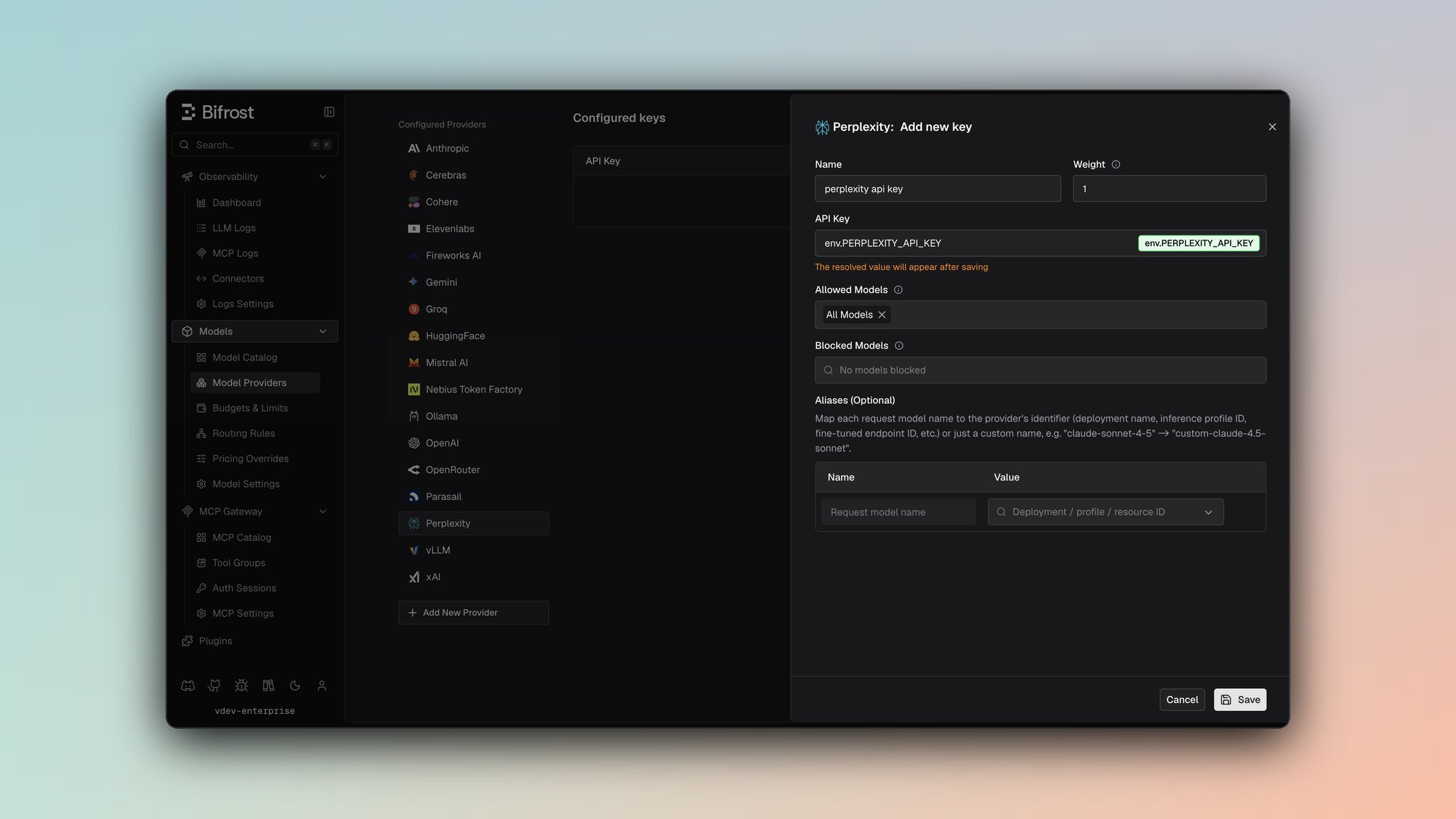 1. Navigate to **Models** > **Model Providers**. Look for **Perplexity** under **Configured Providers**. If it is missing, click on **Add New Provider** and select **Perplexity**.
2. Click **Add Key** or edit an existing key.
3. Set a name for your key.
4. Paste your API key directly or use an environment variable (for example, `env.PERPLEXITY_API_KEY`).
5. Set **Allowed Models** to **All Models** (default) or the specific model allowlist you want this key to serve.
6. Save the provider configuration.
```json theme={null}
{
"providers": {
"perplexity": {
"keys": [
{
"name": "perplexity-key-1",
"value": "env.PERPLEXITY_API_KEY",
"models": [
"*"
],
"weight": 1.0
}
]
}
}
}
```
Refer to the API documentation for [Provider Keys Management](https://docs.getbifrost.ai/api-reference/providers/create-a-key-for-a-provider).
```go theme={null}
case schemas.Perplexity:
return []schemas.Key{{
Name: "perplexity-key-1",
Value: *schemas.NewSecretVar("env.PERPLEXITY_API_KEY"),
Models: []string{"*"},
Weight: 1.0,
}}, nil
```
***
# 1. Chat Completions
## Request Parameters
Perplexity supports most OpenAI chat completion parameters. For standard parameter reference, see [OpenAI Chat Completions](/providers/supported-providers/openai#1-chat-completions).
### Perplexity-Specific Constraints
* **No function calling**: `tools` and `tool_choice` are silently dropped
* **Dropped parameters**: `stop`, `logit_bias`, `logprobs`, `top_logprobs`, `seed`, `parallel_tool_calls`, `service_tier`
* **Reasoning**: Uses `reasoning_effort` instead of `reasoning` object (see [Reasoning & Effort](#reasoning--effort))
### Perplexity-Specific Parameters
Use `extra_params` (SDK) or pass directly in request body (Gateway) for Perplexity-specific search and configuration fields:
```bash theme={null}
curl -X POST http://localhost:8080/v1/chat/completions \
-H "Content-Type: application/json" \
-d '{
"model": "sonar",
"messages": [{"role": "user", "content": "What is the latest news?"}],
"search_mode": "web",
"language_preference": "en",
"return_images": true,
"return_related_questions": true,
"disable_search": false,
"search_domain_filter": ["news.example.com"],
"search_recency_filter": "week"
}'
```
```go theme={null}
resp, err := client.ChatCompletionRequest(schemas.NewBifrostContext(ctx, schemas.NoDeadline), &schemas.BifrostChatRequest{
Provider: schemas.Perplexity,
Model: "sonar",
Input: messages,
Params: &schemas.ChatParameters{
ExtraParams: map[string]interface{}{
"search_mode": "web",
"language_preference": "en",
"return_images": true,
"return_related_questions": true,
"disable_search": false,
"search_domain_filter": []string{"news.example.com"},
"search_recency_filter": "week",
},
},
})
```
#### Search Parameters
| Parameter | Type | Description |
| - | - | - |
| `search_mode` | string | Search mode: `"web"`, `"academic"`, `"news"`, etc. |
| `language_preference` | string | Language preference (e.g., `"en"`, `"fr"`) |
| `search_domain_filter` | string\[] | Restrict search to specific domains |
| `return_images` | boolean | Include images in search results |
| `return_related_questions` | boolean | Return related questions |
| `search_recency_filter` | string | Recency filter: `"hour"`, `"day"`, `"week"`, `"month"`, `"year"` |
| `search_after_date_filter` | string | Search results after date (ISO format) |
| `search_before_date_filter` | string | Search results before date (ISO format) |
| `last_updated_after_filter` | string | Content last updated after date |
| `last_updated_before_filter` | string | Content last updated before date |
| `disable_search` | boolean | Disable web search entirely |
| `enable_search_classifier` | boolean | Enable search classifier |
| `top_k` | integer | Top-k results to use |
#### Media Parameters
| Parameter | Type | Description |
| - | - | - |
| `web_search_options` | object\[] | Array of web search option configurations with user location support |
| `media_response.overrides.return_videos` | boolean | Return videos in results |
| `media_response.overrides.return_images` | boolean | Return images in results |
### Web Search Options
Configure detailed search behavior including location:
```json theme={null}
{
"web_search_options": [
{
"search_context_size": "high",
"user_location": {
"latitude": 40.7128,
"longitude": -74.0060,
"city": "New York",
"country": "US",
"region": "NY"
},
"image_search_relevance_enhanced": true
}
]
}
```
## Reasoning & Effort
### Parameter Mapping
* `reasoning.effort` → `reasoning_effort`
* Supported efforts: `"low"`, `"medium"`, `"high"`
* Special conversion: `"minimal"` → `"low"` (Perplexity normalizes to low/medium/high)
* `reasoning.max_tokens` is silently dropped (Perplexity doesn't support token budget control)
### Example
```json theme={null}
// Request
{"reasoning": {"effort": "high"}}
// Perplexity conversion
{"reasoning_effort": "high"}
// Special case: "minimal" effort
{"reasoning": {"effort": "minimal"}}
→ {"reasoning_effort": "low"}
```
## Response Conversion
### Search Results Inclusion
Perplexity responses include additional fields for search integration:
* `citations[]` - Source citations from search
* `search_results[]` - Full search results with metadata
* `videos[]` - Video results from search
These fields are preserved in the Bifrost response for client use.
### Usage Details
Extended usage tracking specific to Perplexity:
| Field | Source | Description |
| - | - | - |
| `completion_tokens_details.citation_tokens` | `usage.citation_tokens` | Tokens used for citations |
| `completion_tokens_details.num_search_queries` | `usage.num_search_queries` | Number of web search queries performed |
| `completion_tokens_details.reasoning_tokens` | `usage.reasoning_tokens` | Tokens consumed by reasoning process |
| `usage.cost` | `usage.cost` | Cost of the request |
### Example Response
```json theme={null}
{
"id": "...",
"choices": [...],
"usage": {
"prompt_tokens": 100,
"completion_tokens": 150,
"total_tokens": 250,
"completion_tokens_details": {
"citation_tokens": 25,
"num_search_queries": 3,
"reasoning_tokens": 40
},
"cost": { "prompt_cost": 0.001, "completion_cost": 0.002 }
},
"citations": ["https://example.com/article1", "https://example.com/article2"],
"search_results": [
{
"title": "...",
"url": "...",
"snippet": "...",
"date": "2025-01-15"
}
],
"videos": [
{
"title": "...",
"url": "...",
"duration": 300
}
]
}
```
## Streaming
Perplexity uses OpenAI-compatible streaming format. Event sequence:
* `chat.completion.chunk` events with delta updates
* Standard OpenAI finish reason mapping
Streaming with web search may return search results in final chunks.
***
## Caveats
**Severity**: High
**Behavior**: Tool-related parameters are silently dropped
**Impact**: Function calling not available
**Code**: `chat.go:8-36`
**Severity**: Medium
**Behavior**: `"minimal"` effort is mapped to `"low"` (Perplexity only supports low/medium/high)
**Impact**: Requested minimal effort becomes low effort
**Code**: `chat.go:30-36`, `responses.go:25-30`
**Severity**: Low
**Behavior**: `reasoning.max_tokens` is silently dropped
**Impact**: No control over reasoning token budget
**Code**: `chat.go:29-36`
**Severity**: Low
**Behavior**: `stop` parameter is silently dropped
**Impact**: Stop sequences not enforced
**Code**: `chat.go:8-36`
***
# 2. Responses API
The Responses API is adapted for Perplexity by converting to the Chat Completions format internally and returning results in Responses format.
## Request Parameters
### Parameter Mapping
| Parameter | Transformation |
| - | - |
| `max_output_tokens` | Direct pass-through to `max_tokens` |
| `temperature`, `top_p` | Direct pass-through |
| `instructions` | Converted to system message (prepended) |
| `reasoning.effort` | Mapped to `reasoning_effort` (see [Reasoning & Effort](#reasoning--effort)) |
| `text.format` | Passed through as `response_format` |
| `input` (string/array) | Converted to messages |
### Extra Parameters
Same Perplexity-specific search and configuration parameters as Chat Completions (see [Perplexity-Specific Parameters](#perplexity-specific-parameters)).
```bash theme={null}
curl -X POST http://localhost:8080/v1/responses \
-H "Content-Type: application/json" \
-d '{
"model": "sonar",
"instructions": "You are a helpful assistant with web search capabilities",
"input": "What is the latest news in technology?",
"search_mode": "news",
"return_images": true
}'
```
```go theme={null}
resp, err := client.ResponsesRequest(schemas.NewBifrostContext(ctx, schemas.NoDeadline), &schemas.BifrostResponsesRequest{
Provider: schemas.Perplexity,
Model: "sonar",
Input: messages,
Params: &schemas.ResponsesParameters{
Instructions: schemas.Ptr("You are a helpful assistant with web search capabilities"),
ExtraParams: map[string]interface{}{
"search_mode": "news",
"return_images": true,
},
},
})
```
## Conversion Details
* `instructions` becomes a system message prepended to input messages
* `input` (string or array) converted to user message(s)
* Response converted to Responses API format with same search results and extended usage details
## Response Format
Same as Chat Completions with search results, citations, and extended usage tracking preserved.
## Streaming
Responses streaming uses the same OpenAI-compatible streaming as Chat Completions, with results adapted to Responses format.
This documentation is built and hosted on [Mintlify](https://mintlify.com), a developer documentation platform.
1. Navigate to **Models** > **Model Providers**. Look for **Perplexity** under **Configured Providers**. If it is missing, click on **Add New Provider** and select **Perplexity**.
2. Click **Add Key** or edit an existing key.
3. Set a name for your key.
4. Paste your API key directly or use an environment variable (for example, `env.PERPLEXITY_API_KEY`).
5. Set **Allowed Models** to **All Models** (default) or the specific model allowlist you want this key to serve.
6. Save the provider configuration.
```json theme={null}
{
"providers": {
"perplexity": {
"keys": [
{
"name": "perplexity-key-1",
"value": "env.PERPLEXITY_API_KEY",
"models": [
"*"
],
"weight": 1.0
}
]
}
}
}
```
Refer to the API documentation for [Provider Keys Management](https://docs.getbifrost.ai/api-reference/providers/create-a-key-for-a-provider).
```go theme={null}
case schemas.Perplexity:
return []schemas.Key{{
Name: "perplexity-key-1",
Value: *schemas.NewSecretVar("env.PERPLEXITY_API_KEY"),
Models: []string{"*"},
Weight: 1.0,
}}, nil
```
***
# 1. Chat Completions
## Request Parameters
Perplexity supports most OpenAI chat completion parameters. For standard parameter reference, see [OpenAI Chat Completions](/providers/supported-providers/openai#1-chat-completions).
### Perplexity-Specific Constraints
* **No function calling**: `tools` and `tool_choice` are silently dropped
* **Dropped parameters**: `stop`, `logit_bias`, `logprobs`, `top_logprobs`, `seed`, `parallel_tool_calls`, `service_tier`
* **Reasoning**: Uses `reasoning_effort` instead of `reasoning` object (see [Reasoning & Effort](#reasoning--effort))
### Perplexity-Specific Parameters
Use `extra_params` (SDK) or pass directly in request body (Gateway) for Perplexity-specific search and configuration fields:
```bash theme={null}
curl -X POST http://localhost:8080/v1/chat/completions \
-H "Content-Type: application/json" \
-d '{
"model": "sonar",
"messages": [{"role": "user", "content": "What is the latest news?"}],
"search_mode": "web",
"language_preference": "en",
"return_images": true,
"return_related_questions": true,
"disable_search": false,
"search_domain_filter": ["news.example.com"],
"search_recency_filter": "week"
}'
```
```go theme={null}
resp, err := client.ChatCompletionRequest(schemas.NewBifrostContext(ctx, schemas.NoDeadline), &schemas.BifrostChatRequest{
Provider: schemas.Perplexity,
Model: "sonar",
Input: messages,
Params: &schemas.ChatParameters{
ExtraParams: map[string]interface{}{
"search_mode": "web",
"language_preference": "en",
"return_images": true,
"return_related_questions": true,
"disable_search": false,
"search_domain_filter": []string{"news.example.com"},
"search_recency_filter": "week",
},
},
})
```
#### Search Parameters
| Parameter | Type | Description |
| - | - | - |
| `search_mode` | string | Search mode: `"web"`, `"academic"`, `"news"`, etc. |
| `language_preference` | string | Language preference (e.g., `"en"`, `"fr"`) |
| `search_domain_filter` | string\[] | Restrict search to specific domains |
| `return_images` | boolean | Include images in search results |
| `return_related_questions` | boolean | Return related questions |
| `search_recency_filter` | string | Recency filter: `"hour"`, `"day"`, `"week"`, `"month"`, `"year"` |
| `search_after_date_filter` | string | Search results after date (ISO format) |
| `search_before_date_filter` | string | Search results before date (ISO format) |
| `last_updated_after_filter` | string | Content last updated after date |
| `last_updated_before_filter` | string | Content last updated before date |
| `disable_search` | boolean | Disable web search entirely |
| `enable_search_classifier` | boolean | Enable search classifier |
| `top_k` | integer | Top-k results to use |
#### Media Parameters
| Parameter | Type | Description |
| - | - | - |
| `web_search_options` | object\[] | Array of web search option configurations with user location support |
| `media_response.overrides.return_videos` | boolean | Return videos in results |
| `media_response.overrides.return_images` | boolean | Return images in results |
### Web Search Options
Configure detailed search behavior including location:
```json theme={null}
{
"web_search_options": [
{
"search_context_size": "high",
"user_location": {
"latitude": 40.7128,
"longitude": -74.0060,
"city": "New York",
"country": "US",
"region": "NY"
},
"image_search_relevance_enhanced": true
}
]
}
```
## Reasoning & Effort
### Parameter Mapping
* `reasoning.effort` → `reasoning_effort`
* Supported efforts: `"low"`, `"medium"`, `"high"`
* Special conversion: `"minimal"` → `"low"` (Perplexity normalizes to low/medium/high)
* `reasoning.max_tokens` is silently dropped (Perplexity doesn't support token budget control)
### Example
```json theme={null}
// Request
{"reasoning": {"effort": "high"}}
// Perplexity conversion
{"reasoning_effort": "high"}
// Special case: "minimal" effort
{"reasoning": {"effort": "minimal"}}
→ {"reasoning_effort": "low"}
```
## Response Conversion
### Search Results Inclusion
Perplexity responses include additional fields for search integration:
* `citations[]` - Source citations from search
* `search_results[]` - Full search results with metadata
* `videos[]` - Video results from search
These fields are preserved in the Bifrost response for client use.
### Usage Details
Extended usage tracking specific to Perplexity:
| Field | Source | Description |
| - | - | - |
| `completion_tokens_details.citation_tokens` | `usage.citation_tokens` | Tokens used for citations |
| `completion_tokens_details.num_search_queries` | `usage.num_search_queries` | Number of web search queries performed |
| `completion_tokens_details.reasoning_tokens` | `usage.reasoning_tokens` | Tokens consumed by reasoning process |
| `usage.cost` | `usage.cost` | Cost of the request |
### Example Response
```json theme={null}
{
"id": "...",
"choices": [...],
"usage": {
"prompt_tokens": 100,
"completion_tokens": 150,
"total_tokens": 250,
"completion_tokens_details": {
"citation_tokens": 25,
"num_search_queries": 3,
"reasoning_tokens": 40
},
"cost": { "prompt_cost": 0.001, "completion_cost": 0.002 }
},
"citations": ["https://example.com/article1", "https://example.com/article2"],
"search_results": [
{
"title": "...",
"url": "...",
"snippet": "...",
"date": "2025-01-15"
}
],
"videos": [
{
"title": "...",
"url": "...",
"duration": 300
}
]
}
```
## Streaming
Perplexity uses OpenAI-compatible streaming format. Event sequence:
* `chat.completion.chunk` events with delta updates
* Standard OpenAI finish reason mapping
Streaming with web search may return search results in final chunks.
***
## Caveats
**Severity**: High
**Behavior**: Tool-related parameters are silently dropped
**Impact**: Function calling not available
**Code**: `chat.go:8-36`
**Severity**: Medium
**Behavior**: `"minimal"` effort is mapped to `"low"` (Perplexity only supports low/medium/high)
**Impact**: Requested minimal effort becomes low effort
**Code**: `chat.go:30-36`, `responses.go:25-30`
**Severity**: Low
**Behavior**: `reasoning.max_tokens` is silently dropped
**Impact**: No control over reasoning token budget
**Code**: `chat.go:29-36`
**Severity**: Low
**Behavior**: `stop` parameter is silently dropped
**Impact**: Stop sequences not enforced
**Code**: `chat.go:8-36`
***
# 2. Responses API
The Responses API is adapted for Perplexity by converting to the Chat Completions format internally and returning results in Responses format.
## Request Parameters
### Parameter Mapping
| Parameter | Transformation |
| - | - |
| `max_output_tokens` | Direct pass-through to `max_tokens` |
| `temperature`, `top_p` | Direct pass-through |
| `instructions` | Converted to system message (prepended) |
| `reasoning.effort` | Mapped to `reasoning_effort` (see [Reasoning & Effort](#reasoning--effort)) |
| `text.format` | Passed through as `response_format` |
| `input` (string/array) | Converted to messages |
### Extra Parameters
Same Perplexity-specific search and configuration parameters as Chat Completions (see [Perplexity-Specific Parameters](#perplexity-specific-parameters)).
```bash theme={null}
curl -X POST http://localhost:8080/v1/responses \
-H "Content-Type: application/json" \
-d '{
"model": "sonar",
"instructions": "You are a helpful assistant with web search capabilities",
"input": "What is the latest news in technology?",
"search_mode": "news",
"return_images": true
}'
```
```go theme={null}
resp, err := client.ResponsesRequest(schemas.NewBifrostContext(ctx, schemas.NoDeadline), &schemas.BifrostResponsesRequest{
Provider: schemas.Perplexity,
Model: "sonar",
Input: messages,
Params: &schemas.ResponsesParameters{
Instructions: schemas.Ptr("You are a helpful assistant with web search capabilities"),
ExtraParams: map[string]interface{}{
"search_mode": "news",
"return_images": true,
},
},
})
```
## Conversion Details
* `instructions` becomes a system message prepended to input messages
* `input` (string or array) converted to user message(s)
* Response converted to Responses API format with same search results and extended usage details
## Response Format
Same as Chat Completions with search results, citations, and extended usage tracking preserved.
## Streaming
Responses streaming uses the same OpenAI-compatible streaming as Chat Completions, with results adapted to Responses format.
This documentation is built and hosted on [Mintlify](https://mintlify.com), a developer documentation platform.